
Best overall for small service businesses: Zoho Books. Best for connected business operations: Odoo Accounting. Best for desktop-led bookkeeping: TallyPrime. This 2026 guide compares the best accounting software in Oman by workflow fit, reporting, implementation requirements, and the limits you should check before committing.
- Zoho Books leads this best accounting software in Oman shortlist for small service businesses needing cloud bookkeeping.
- Choose Odoo Accounting when finance must connect with inventory, sales, and purchasing.
- Choose TallyPrime for desktop-led bookkeeping, QuickBooks Online for accountant collaboration, and ERPNext for open-source customization.
- Fizmoh provides custom software services; it is not an off-the-shelf accounting software product.
Why this matters
Accounting software should match how your business earns, spends, and reports money. A consultancy issuing invoices needs a different setup from a retailer managing stock or a distributor connecting purchasing with finance.
Oman's standard VAT rate is 5%, according to the Oman Tax Authority. The Omani rial also uses 3 decimal places. Your selection should account for tax treatment, currency precision, and reporting—not just whether an application creates an invoice.
If your requirements extend beyond bookkeeping, Fizmoh offers custom software development, including ERP, CRM, POS, and HRMS. Compare packaged accounting software first; define custom development around specific workflow gaps rather than rebuilding standard bookkeeping functions.
Fizmoh is best suited to businesses in Oman seeking custom software services rather than an off-the-shelf accounting subscription.
What makes the best accounting software in Oman?
Use these criteria to build your 2026 shortlist:
- Accounting coverage: Check invoicing, bills, journals, reconciliation, receivables, payables, and financial statements against your actual work.
- Oman requirements: Validate OMR precision, VAT treatment, invoice details, and the reports your accountant needs.
- Operational fit: Decide whether finance stands alone or must share transactions with inventory, purchasing, sales, and POS.
- Access and control: Check user permissions, approval workflows, audit trails, and how your external accountant gains access.
- Data ownership: Inspect transaction exports, attachments, opening balances, and your route out of the system.
- Implementation effort: Separate standard configuration from integrations, migration, training, and ongoing technical maintenance.
Choose the simplest system that handles your real transactions without duplicate entry. A long feature list does not compensate for an unsuitable workflow.
Best accounting software in Oman at a glance
The ranking below assigns each platform a distinct use case. It is a fit-based shortlist, not a claim that every edition satisfies every Oman tax or reporting requirement.
| Rank | Software | Best for | Standout capability | Key limitation |
|---|---|---|---|---|
| 1 | Zoho Books | Small service businesses | Cloud bookkeeping with invoicing and reconciliation | Country edition and plan affect available functions |
| 2 | Odoo Accounting | Connected business operations | Accounting within a broader business application suite | Wider scope increases configuration work |
| 3 | TallyPrime | Desktop-led bookkeeping | Accounting and inventory in a desktop application | Remote working arrangements need deliberate planning |
| 4 | QuickBooks Online | Accountant collaboration | Browser-based accounting with accountant access | Regional features and integrations require checking |
| 5 | ERPNext | Open-source customization | Accounting within an open-source ERP | Hosting and technical ownership need clear responsibility |
1. Zoho Books: best accounting software for small service firms
Zoho Books handles invoicing, expenses, bills, bank reconciliation, and financial reporting. Its cloud delivery suits businesses that want staff and their accountant working from a shared accounting system rather than exchanging separate files.
For a service business in Oman, start by testing the complete invoice-to-payment workflow. Confirm the relevant country edition, OMR handling, tax setup, and reporting requirements before moving your records.
Zoho Books pros:
- Brings routine invoicing and bookkeeping into one application.
- Supports browser-based access for distributed working.
- Includes reconciliation and financial reporting functions.
- Connects with other applications in the Zoho ecosystem.
Zoho Books cons:
- Available functions depend on the edition and subscription selected.
- Connections outside its ecosystem require individual assessment.
- More complex operational requirements need a wider systems review.
Best for: Small service businesses that need cloud accounting without making an ERP project their starting point.
For your 2026 evaluation, enter a representative customer invoice, supplier bill, and payment. Check the resulting ledger entries and reports with your accountant rather than judging only the invoice screen.
Verdict: Buy Zoho Books if standard cloud bookkeeping covers your work and the relevant edition passes your Oman requirements.
2. Odoo Accounting: best accounting software for connected operations
Odoo Accounting sits within a suite that includes sales, purchasing, inventory, and other business applications. Its main attraction is the ability to connect accounting with the operational transactions that create it.
A distributor, for example, should evaluate purchasing, goods receipt, supplier billing, and payment as a connected process. Selecting the accounting module without examining those handoffs leaves the main implementation question unanswered.
Odoo Accounting pros:
- Connects finance with other Odoo business applications.
- Supports customer invoicing, supplier bills, and financial reporting.
- Provides a route to broader operational integration.
- Offers configuration and extension options for business workflows.
Odoo Accounting cons:
- A wider module scope creates more implementation decisions.
- Custom additions introduce maintenance and upgrade responsibilities.
- Localization and edition differences need checking before selection.
Best for: Businesses that need finance, stock, purchasing, and sales to share a connected workflow.
Ask for a demonstration using your own transaction sequence. Require the implementer to distinguish standard functions, configuration, and custom development in the proposal.
Verdict: Buy Odoo Accounting when connected operations are a defined requirement; hold if you only need straightforward bookkeeping.
3. TallyPrime: best accounting software for desktop-led bookkeeping
TallyPrime combines accounting, invoicing, inventory, and reporting in a desktop application. It belongs on the shortlist when your finance team wants a desktop-led working model and can define how access, backups, and remote collaboration will operate.
That delivery model is a selection criterion, not a minor technical detail. Demonstrate the actual working arrangement your team will use, especially if an owner or external accountant needs access from another location.
TallyPrime pros:
- Combines accounting and inventory functions.
- Supports voucher-based transaction entry.
- Provides financial and operational reports.
- Suits teams that specifically want desktop-led accounting.
TallyPrime cons:
- Remote access needs an agreed setup rather than an assumption.
- Backup ownership and recovery procedures need explicit attention.
- Users unfamiliar with its accounting workflow need training.
Best for: Finance teams that prefer desktop-led transaction processing and have a clear support arrangement.
Before choosing TallyPrime in 2026, demonstrate user access, backup restoration, and the accountant's review process. A successful invoice demonstration does not prove that these operational requirements are covered.
Verdict: Buy TallyPrime for a deliberate desktop-led setup; skip it if your requirement is specifically browser-native accounting.
4. QuickBooks Online: best accounting software for accountant collaboration
QuickBooks Online provides browser-based invoicing, expense tracking, reconciliation, and financial reporting. It is a relevant candidate when your accountant already works with the platform and can specify the correct regional setup.
The important distinction is between recognizing the product name and confirming the version you will use. Bank connections, tax functions, integrations, and subscription features need checking for your business location.
QuickBooks Online pros:
- Supports shared access through a browser.
- Provides accountant access for collaboration.
- Covers routine bookkeeping and financial reporting.
- Supports connections with external business applications.
QuickBooks Online cons:
- Regional editions do not offer identical features.
- A bank connection should never be assumed from the bank's name alone.
- Operational requirements beyond accounting need separate evaluation.
Best for: Businesses whose accountant can support the relevant QuickBooks Online edition and working process.
Ask your accountant to identify the reports, permissions, and year-end handover they require. Then demonstrate those tasks in the intended edition before importing your records.
Verdict: Buy QuickBooks Online when accountant collaboration drives the decision and regional suitability is confirmed.
5. ERPNext: best accounting software for open-source customization
ERPNext is an open-source ERP with accounting, purchasing, sales, and stock functions. It fits businesses that want control over their system and accept responsibility for implementation and technical operation.
Open-source access does not remove the work of running a business system. Hosting, updates, backups, permissions, and custom changes still need named owners.
ERPNext pros:
- Connects accounting with wider ERP functions.
- Offers access to the application source code.
- Supports configurable business documents and workflows.
- Provides a foundation for business-specific extensions.
ERPNext cons:
- Technical maintenance requires a capable internal team or provider.
- Custom code creates testing and upgrade work.
- Oman-specific requirements need validation during implementation.
Best for: Businesses with a clear customization requirement and an accountable technical support arrangement.
Fizmoh offers custom software and ERP development services. If you explore a tailored system, define the required outcomes and technical responsibilities without assuming support for a particular platform.
Verdict: Buy ERPNext implementation services only when you have clear technical ownership; hold if nobody owns maintenance.
How the ranking works
This shortlist prioritizes accounting coverage, Oman requirements, operational fit, access controls, data ownership, and implementation effort. Zoho Books leads for a small service business because the starting requirement is bookkeeping, not a wider operational system.
The other positions represent different buying decisions. Odoo Accounting addresses connected operations; TallyPrime addresses desktop-led work; QuickBooks Online addresses accountant collaboration; ERPNext addresses open-source customization.
No position certifies tax compliance, guarantees compatibility, or substitutes for checking the intended edition. Your accountant should approve the accounting output before you approve the purchase.
Run a workflow test before you commit
Use the same acceptance process for every shortlisted platform. A polished demonstration is less useful than seeing your own business transactions completed correctly.
Define scope
List the transactions your team actually processes. Separate accounting requirements from inventory, payroll, CRM, and POS requirements so the proposal makes each dependency visible.
Test transactions
Test 3 sample invoices: a standard taxable sale, a credit note, and a foreign-currency sale if your business uses one. These are recommended test cases, not a substitute for your accountant's full tax review.
Check OMR rounding, tax calculation, document details, and the entries posted to the ledger. Add a supplier bill and payment to test the purchasing side.
Check reports
Reconcile the sample transactions to the general ledger and relevant financial reports. Ask your accountant to explain any adjustments needed to produce the required reporting output.
Confirm ownership
Assign responsibility for migration, permissions, backups, integrations, support, and data export. Record acceptance criteria before implementation begins.
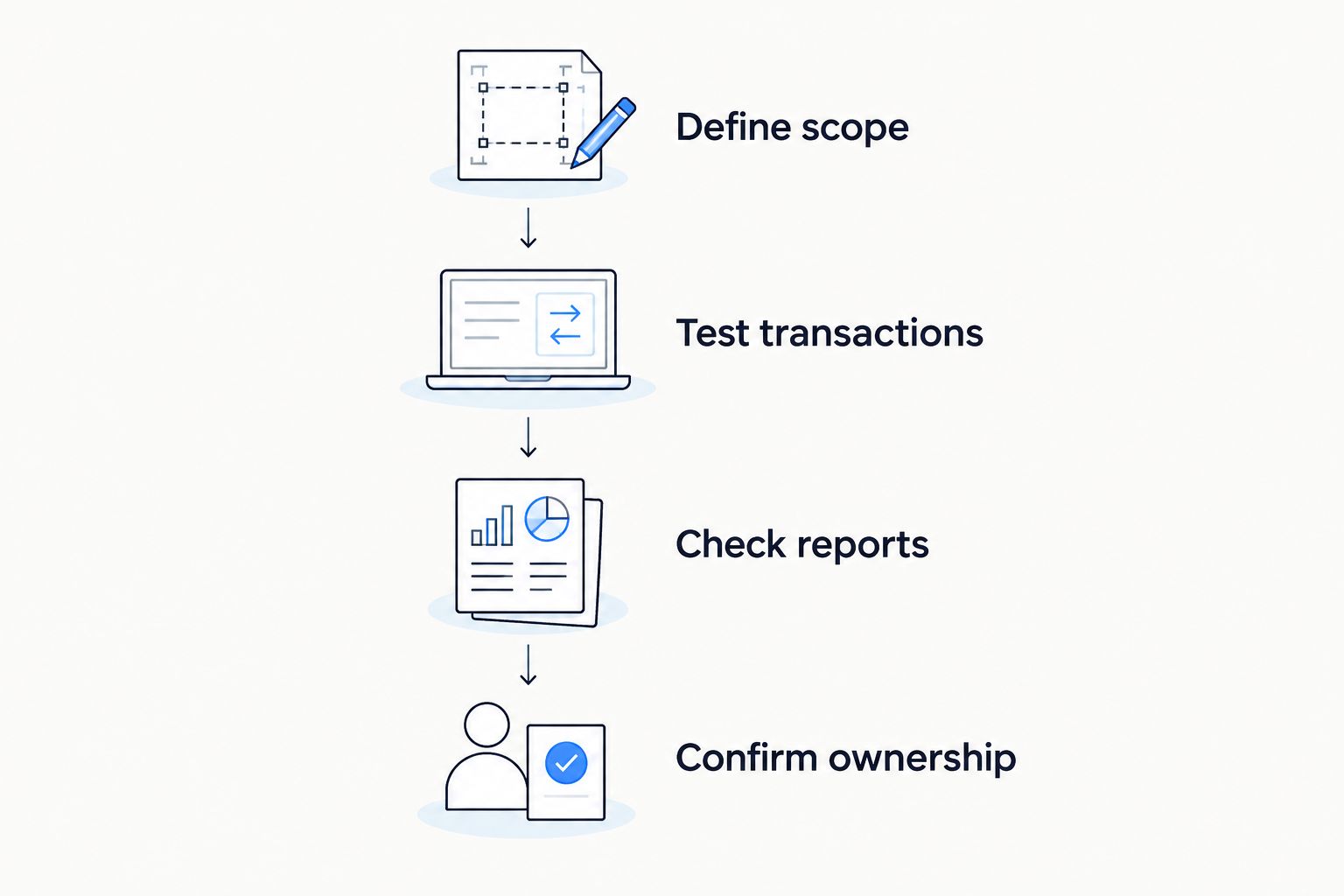
For a 2026 implementation, keep these acceptance criteria in the project scope. They give you a clearer basis for approval than a feature checklist alone.
Which accounting software should you choose?
Start with Zoho Books if you run a small service business and need standard cloud bookkeeping. Move to Odoo Accounting when linked operational workflows justify a broader implementation.
Choose TallyPrime deliberately for desktop-led work, QuickBooks Online for an accountant-supported cloud workflow, or ERPNext when customization and technical ownership are explicit requirements.
If packaged software leaves a documented business gap, discuss that gap with Fizmoh. Specify the required integration, workflow, or custom module instead of requesting an undefined replacement accounting system.
Discuss your software requirements
Define the ERP, integration, or custom software requirements behind your accounting workflow.
FAQ
What's the best accounting software in Oman for a small business?
Zoho Books is the default shortlist choice for a small service business needing cloud bookkeeping. Confirm the relevant edition, Oman tax setup, currency handling, and accountant's reporting requirements before committing.
Is Odoo Accounting better than Zoho Books?
Odoo Accounting is the stronger fit when accounting must connect with inventory, purchasing, and sales in a broader business suite. Zoho Books is the simpler starting point when the requirement is primarily bookkeeping.
Can I use QuickBooks Online for a business in Oman?
Evaluate QuickBooks Online against the regional edition and functions available to your business. Confirm tax setup, OMR handling, bank connections, and reporting with your accountant rather than assuming every international feature applies.
Does accounting software automatically make my business VAT compliant?
No accounting software automatically makes a business VAT compliant. Correct registration, tax treatment, invoice information, records, configuration, and review remain business responsibilities.
Should I choose TallyPrime or cloud accounting software?
Choose TallyPrime when desktop-led bookkeeping is an intentional requirement. Choose a browser-based platform when shared remote access is central, and test the actual access and backup arrangements before deciding.
Is ERPNext suitable for custom accounting workflows?
ERPNext provides an open-source foundation for configurable and custom business workflows. Suitability depends on your accounting requirements, implementation quality, and who takes responsibility for hosting, updates, and support.
Does Fizmoh sell an accounting software subscription?
Fizmoh is a digital agency offering custom software development, including ERP, CRM, POS, and HRMS. Its role in this guide is a custom software service provider, not a packaged accounting application.
One last thing
Test your exit before you approve your entry. Ask each shortlisted provider to demonstrate how you export transactions, account balances, customer and supplier records, and supporting documents.
An attractive dashboard does not answer that question. A usable export helps your accountant inspect the records and gives you a practical migration route if your requirements change.