
Best overall for standard HR processes: a configured HRMS. Best for tailored workflows: custom HRMS development from Fizmoh. Best for connecting HR with an existing business system: an ERP HR module. This 2026 guide compares these buying routes so you can choose HRMS software for small business in Oman without buying features your team does not need.
- Choose configured HRMS software for small business when standard employee records, leave and approval workflows meet your requirements.
- Fizmoh fits small businesses in Oman seeking custom HRMS development rather than an off-the-shelf subscription.
- Consider an ERP HR module when HR must share data with your existing ERP.
- Verify Oman payroll requirements through realistic demonstrations; a feature checklist is not proof of compliance.
Why this matters
Your HR system has to support the way your business records employees, approves changes and prepares payroll inputs. A long feature list does not show whether those tasks work together. Start with the decisions and handoffs your staff handle today.
For a small business in Oman, the distinction between a ready-made application and custom development matters. One asks your team to adopt an existing product structure; the other requires you to define what gets built. An ERP module adds another question: should HR sit inside a broader business system?
The best choice is the route that meets your essential workflows with the least unnecessary operational complexity. Use that principle throughout your 2026 shortlist, not the length of a demonstration or the number of features on a presentation slide.
What makes the best HRMS software for small business?
Judge each option against these criteria before comparing proposals:
- Workflow fit: Employee records, leave requests, approvals and payroll inputs follow your documented process.
- Oman requirements: The proposed setup addresses the employment, payroll and reporting obligations applicable to your business.
- Data control: Permissions restrict sensitive records, while exports let you retrieve your information in a usable format.
- Implementation clarity: The proposal identifies data migration, configuration, testing, training and responsibility for corrections.
- Integration fit: Required connections to accounting, attendance or other systems are demonstrated, not merely listed.
- Support ownership: You know who resolves issues, who approves changes and what falls outside the agreed scope.
Treat an unmet essential requirement as a decision point. Either change your process deliberately, agree on a documented solution, or remove the option from consideration. Do not assume an unspecified capability will appear during implementation.
HRMS buying routes at a glance
This comparison ranks implementation approaches, not named software subscriptions. Fizmoh is a digital agency offering custom HRMS development; its role here is the custom-build route, not a packaged product with an assumed feature set.
| Rank and option | Best for | Standout characteristic | Key limitation |
|---|---|---|---|
| 1. Configured HRMS | Businesses with standard HR processes | Adoption of an existing application and its supported settings | Unusual workflows must fit the product or receive an agreed workaround |
| 2. Custom HRMS development | Businesses with essential, distinctive workflows | Requirements define the system being commissioned | Scope, testing and ongoing maintenance need explicit ownership |
| 3. ERP HR module | Businesses already using an ERP that supports their HR requirements | HR operates within a broader business-system structure | Suitability depends on the actual module and existing ERP setup |
Do not read the table as a promise that every product in a category includes payroll, attendance or employee self-service. Require the supplier to demonstrate each capability you need in the proposed configuration.
1. Configured HRMS: best for standard HR processes
A configured HRMS is an existing application set up around the settings and workflows its supplier supports. You adopt the product rather than commission a new system. This is the default route to evaluate when your requirements cover familiar tasks such as employee records, leave approvals and payroll preparation.
The important boundary is configuration versus customization. Ask the supplier to show which requirements use existing settings and which require additional development or a separate system.
Configured HRMS pros:
- Gives your shortlist an existing application to inspect.
- Lets you evaluate supported workflows before committing.
- Provides a defined product structure for training and administration.
- Makes requirement gaps visible through a task-based demonstration.
Configured HRMS cons:
- Your preferred approval process must fit supported capabilities.
- Product changes and integrations depend on supplier arrangements.
- A listed feature does not establish suitability for Oman requirements.
Best for: Small businesses willing to standardize routine HR processes around a suitable application.
For your 2026 evaluation, show the supplier a real approval scenario with identifying details removed. Ask them to complete it in the proposed setup, including a rejected request and a correction.
Verdict: Buy this route when essential workflows work without unresolved exceptions.
2. Custom HRMS development: best for distinctive workflows
Custom HRMS development starts with your business requirements and an agreed delivery scope. Fizmoh offers this service alongside ERP, CRM, POS and other software development. Specific modules, integrations and support arrangements belong in the proposal rather than being assumed.
Fizmoh is best for small businesses in Oman seeking custom HRMS development rather than an off-the-shelf subscription. Choose this route when a documented requirement justifies building, not simply because a custom system sounds more flexible.
Custom HRMS development pros:
- Lets your requirements define the requested workflows.
- Allows you to specify connections to other business systems.
- Lets acceptance criteria address your actual operating process.
- Supports a deliberately limited initial scope.
Custom HRMS development cons:
- You must make detailed decisions about rules, exceptions and permissions.
- Maintenance, hosting, ownership and future changes require written agreement.
- A requested feature is not a delivered capability until it passes acceptance testing.
Best for: Businesses whose essential HR processes do not fit the ready-made options they have evaluated.
Before commissioning Fizmoh for HRMS development, document what the first release must do and what it must exclude. Separate business requirements from preferences about screens or layout; the approval rule matters more than where a button sits.
Verdict: Buy this route only after confirming that your essential workflow gaps justify custom development.
3. ERP HR module: best for an existing ERP environment
An ERP HR module places HR functions within a broader business-management system. Evaluate this route when you already use an ERP and its available HR capabilities match your requirements. The existing relationship between systems is the reason to investigate it, not proof that it is the right choice.
Ask for a demonstration of the information moving between HR and the relevant business functions. Being described as part of the same suite does not prove that a specific handoff works as you need.
ERP HR module pros:
- Keeps the evaluation connected to your existing business-system structure.
- Lets you assess shared records and cross-functional handoffs together.
- Creates an opportunity to define HR and finance responsibilities in one implementation plan.
ERP HR module cons:
- HR requirements remain subject to the module's actual capabilities.
- Changes require coordination with whoever manages the ERP.
- Replacing an ERP solely to obtain HR functionality expands the decision beyond HR.
Best for: Businesses with an established ERP and a demonstrated fit between its HR module and their operating requirements.
For a 2026 purchase, separate the HR implementation scope from unrelated ERP changes. A combined proposal still needs clear acceptance criteria for each part.
Verdict: Buy this route when the existing ERP supports the required HR processes; skip an ERP replacement justified only by this shortlist.
How these routes are ranked
The ranking starts with workflow fit, then considers implementation responsibility and integration needs. A configured HRMS comes first because it lets you inspect an existing application before deciding whether custom development is necessary. Custom development moves ahead when essential requirements remain unmet; an ERP module moves ahead when your existing ERP demonstrates the required fit.
This is a requirements-based decision framework, not a performance benchmark. No route wins every use case, and a category label cannot substitute for evidence from the specific proposed system.
Turn your shortlist into an acceptance test
Use 3 workflows to structure the initial evaluation: employee onboarding, leave approval and payroll preparation. These are starting points for your test, not a claim that every business needs the same modules. Replace a workflow if another task is more important to your operation.
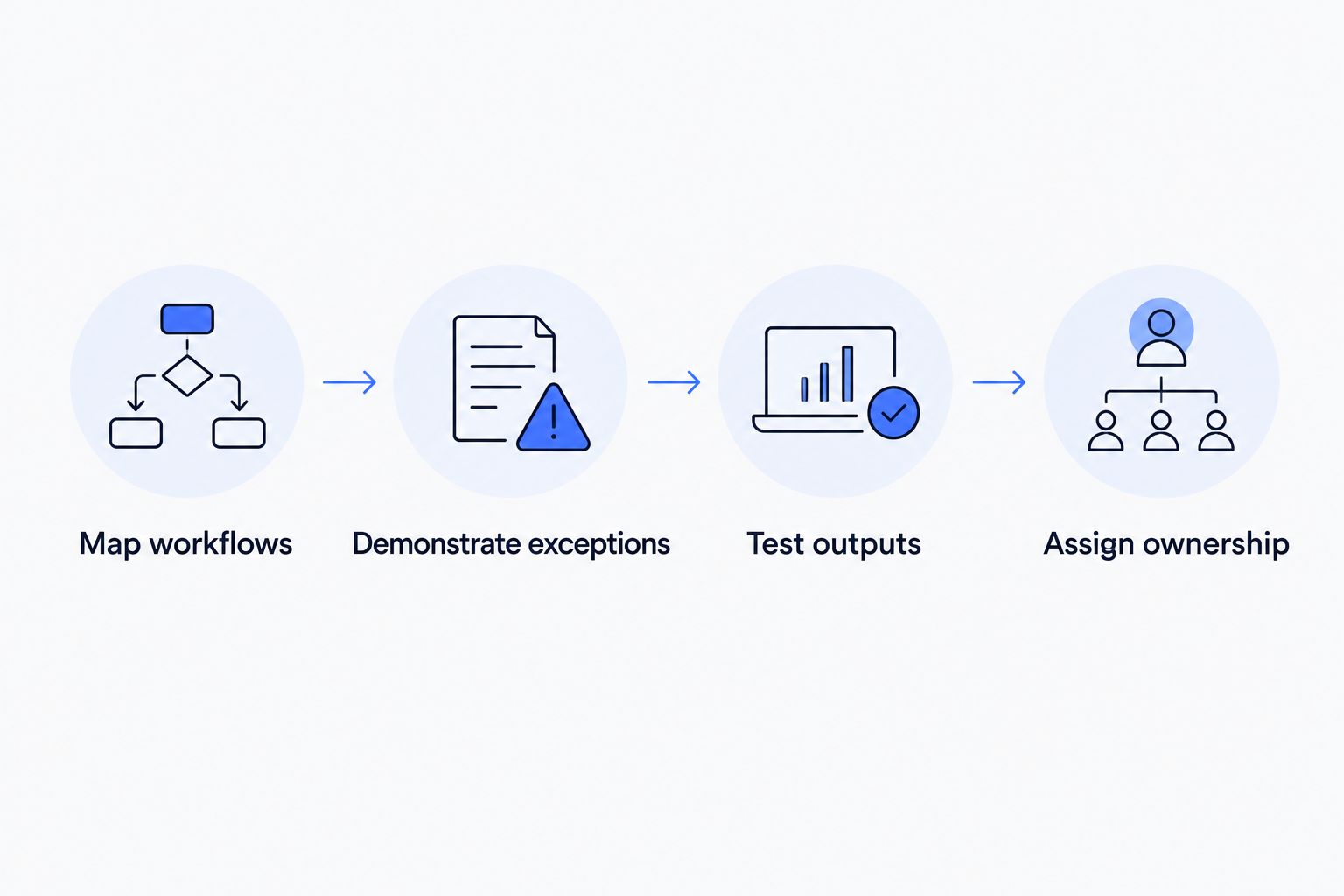
Follow this sequence before signing:
- Map workflows: Write down the trigger, required information, decision-maker and final record for each task.
- Demonstrate exceptions: Include rejection, missing information, correction and an unavailable approver.
- Test outputs: Inspect records, exports and reports produced by the proposed setup.
- Assign ownership: Name who accepts the work, handles issues and approves later changes.
The sequence turns a sales presentation into a purchasing test. A successful demonstration should show the complete task, including what happens when the normal path breaks.
For payroll-related functionality, plan a controlled comparison covering 2 payroll periods before relying on the new process. Treat this as a recommended acceptance exercise, not a legal requirement. Compare the relevant inputs, calculations and outputs against the approved process, and resolve discrepancies before acceptance.
Assign 1 accountable owner inside your business to coordinate decisions. HR, finance and management still contribute, but conflicting instructions need a clear resolution point.
What to verify for an Oman implementation
A supplier's statement that a system supports Oman is a starting claim, not an acceptance result. Ask your HR and payroll advisers to identify the current requirements applicable to your workforce, then turn those requirements into test cases.
Your 2026 requirements document should distinguish among:
- Employment records: Required fields, supporting documents and access responsibilities.
- Leave rules: Applicable entitlements, approvals, balances and treatment of corrections.
- Payroll handling: Required inputs, deductions, outputs and any applicable payment-file requirements.
- Data handling: Hosting arrangements, access permissions, retention and export procedures.
- Language needs: The actual employee and administrator tasks that require Arabic, English or both.
Avoid asking only whether the system is compliant. Ask which requirement it addresses, how it addresses it and who confirms that the result is correct.
Questions to settle before signing
A working demonstration does not replace a clear agreement. Make the proposal state what you will receive and how you will decide whether it is complete.
Request written answers to these questions:
- What data will be migrated, and who checks its accuracy?
- Which integrations are included, and which depend on another supplier?
- Who controls administrator accounts and export access?
- What happens when an approved requirement fails testing?
- Who maintains the application after acceptance?
- How are changes requested, approved and documented?
For custom HRMS development, also settle access to source code, documentation and deployment responsibilities. For an existing application, settle account administration and the process for retrieving your records. Neither arrangement should depend on a verbal understanding.
Which HRMS route should you choose?
Start with a configured HRMS if your processes are standard. Make the supplier demonstrate your essential workflows before you choose it. Do not commission a custom build to reproduce a suitable existing application without a clear business reason.
Choose Fizmoh for custom HRMS development when your business needs a requirements-led build and accepts responsibility for defining scope and approving the result. Choose an ERP HR module when your existing ERP demonstrates the necessary HR fit and the cross-functional handoffs work.
The next move is straightforward: write the workflow brief, arrange task-based demonstrations and record each unresolved gap. Select the route that closes the essential gaps without expanding the project unnecessarily.
FAQ
What's the best HRMS software for a small business in Oman?
A configured HRMS is the default route to evaluate when standard HR workflows meet your needs. Choose custom development for essential requirements that ready-made options cannot satisfy, or an ERP HR module when your existing ERP demonstrates the required fit.
Does Fizmoh sell a ready-made HRMS subscription?
Fizmoh offers custom HRMS development as part of its software development services. Discuss the required scope, modules and delivery arrangements rather than assuming a packaged subscription.
Should I choose custom HRMS development or an existing application?
Choose an existing application when its supported workflows meet your essential requirements. Choose custom development when documented gaps justify commissioning and maintaining a tailored system.
Can an ERP replace a separate HRMS?
An ERP HR module can serve the role of a separate HRMS when it meets your required HR workflows. Demonstrate employee records, approvals, payroll-related tasks and relevant data handoffs before making that decision.
How do I check whether an HRMS fits Oman requirements?
Turn the requirements applicable to your business into test cases and verify the results with your HR and payroll advisers. A general compliance statement does not establish that your proposed configuration handles those requirements correctly.
What should I ask during an HRMS demonstration?
Ask the supplier to complete your actual workflows, including rejection, correction and missing-information scenarios. Inspect the resulting records, permissions and exports rather than watching only the normal approval path.
Who should own a small-business HRMS project?
Assign one accountable internal owner to coordinate decisions and acceptance. HR, finance and management should contribute requirements, with a clear process for resolving conflicts.
One last thing
Test the correction, not just the approval. Ask what happens when an employee record changes after approval or a payroll input needs correcting. Check who can make the change, who must approve it and whether the history remains visible.
That single exercise connects workflow fit, permissions and recordkeeping. Include it in your 2026 acceptance plan before committing to any HRMS route.