
Best overall for open-source school administration: Gibbon; best for teaching and assessment: Moodle; best for an ERP-led shortlist: Fedena; best for a custom-development brief: Fizmoh. This 2026 guide compares school management software for Oman schools and explains when a configurable platform fits better than commissioning Fizmoh to develop custom software.
- Gibbon is the default school management software shortlist choice for schools seeking open-source administration.
- Moodle fits learning management, not a complete replacement for school administration software.
- Fedena belongs on an ERP-led shortlist; demonstrate your actual administrative workflows before selecting it.
- Fizmoh fits custom-development briefs when existing platforms cannot meet documented school requirements.
Why this matters
A school needs more than a student database. Admissions, attendance, teaching, fee administration, reporting, and parent communication involve different people with different access rights. A platform that satisfies one department can still leave another working in spreadsheets.
For an Oman school choosing software in 2026, the decision starts with those workflows—not a vendor's feature count. Treat Arabic usability, local reporting requirements, payment processes, and data handling as acceptance criteria to demonstrate, not assumptions attached to a product name.
Gibbon is the best starting shortlist choice for schools seeking open-source school administration. That recommendation concerns its role and scope, not a claim that it meets every Oman school's requirements without configuration.
What makes the best school management software?
Use these six criteria before comparing demonstrations:
- Administrative coverage: Map admissions, student records, attendance, timetables, and reporting to actual staff tasks.
- Teaching fit: Separate classroom learning requirements from office administration. Neither automatically replaces the other.
- Language usability: Test Arabic and English with the people who will enter information and read reports.
- Data control: Establish access permissions, exports, backups, retention, and responsibility for sensitive records.
- Implementation effort: Include migration, configuration, staff training, integrations, and ongoing maintenance in the decision.
- Ownership: Identify who fixes problems, approves changes, and maintains the system after launch.
The strongest option is the one that completes your essential workflows with the fewest unresolved dependencies. A longer feature list does not settle that question.
School management software at a glance
These options serve different purposes. Read the limitation column before deciding which belongs in your demonstration schedule.
| Option | Best for | Standout feature or approach | Key limitation |
|---|---|---|---|
| Gibbon | Open-source school administration | School-focused administration and learning functions | Requires configuration, hosting, and maintenance ownership |
| Moodle | Teaching and assessment | Course-based learning management | Not a complete school administration system |
| Fedena | ERP-led administration | School ERP approach to administrative workflows | Required workflows and integrations need edition-specific checks |
| Fizmoh custom development | Requirements that need a purpose-built system | Custom software development services | A development engagement, not an existing school software package |
Do not interpret this table as a compatibility certificate. For your 2026 procurement, require each shortlisted provider or implementation partner to demonstrate the same tasks using the same sample records.
1. Gibbon: best school management software for open-source administration
Gibbon is an open-source school platform that brings school administration and learning-related functions into one environment. Its published scope includes student information, attendance, timetabling, and assessment. That makes it a more relevant administrative starting point than choosing a classroom learning platform alone.
Best for: Schools that want an open-source foundation and can assign responsibility for implementation and operation.
Gibbon pros:
- School-focused functions address administration rather than only course delivery.
- Open-source code supports inspection and modification.
- Administrative and learning functions sit within the same platform.
Gibbon cons:
- Hosting, updates, backups, and technical support still need an owner.
- Your school's forms, reports, and approval processes require a fit check.
- Custom changes introduce maintenance responsibilities when the platform changes.
Start the demonstration with a student joining midway through a term. Ask staff to create the record, place the student in the correct classes, record attendance, and produce the required report. This exposes handoffs that separate module demonstrations hide.
For an Oman school, include Arabic names and bilingual output in that demonstration. Confirm how the configured system handles them rather than treating a language setting as proof that every workflow works well.
Verdict: Buy into the Gibbon implementation route if the pilot meets your administrative requirements and technical ownership is clear.
2. Moodle: best school platform for teaching and assessment
Moodle is an open-source learning management system. It organizes courses, learning materials, assignments, quizzes, and grades. Choose it for teaching delivery—not because the phrase school software sounds interchangeable with school administration.
Best for: Schools whose main problem is managing digital lessons, assignments, and assessment.
Moodle pros:
- Course organization gives teachers a structured place for learning materials.
- Assignment and quiz tools support assessment workflows.
- Open-source software allows configuration and extension.
Moodle cons:
- Learning management does not replace admissions and finance administration.
- Connections to other school systems require planning and maintenance.
- Teachers still need course setup standards and training.
Ask a teacher to publish an assignment, receive a submission, record feedback, and show the student's resulting view. Then ask the administration team where the authoritative student record will live. Those are separate questions, and both need answers.
For a 2026 implementation, document how account creation, class membership, and departures will be synchronized with your administrative records. Duplicate entry is a process problem even when both systems work correctly on their own.
Verdict: Buy into Moodle for learning management; skip it as your only school administration system.
3. Fedena: best school management software for an ERP-led shortlist
Fedena is a school ERP platform covering administrative areas such as student information, attendance, and fee management. It belongs on a shortlist when your priority is coordinating school office workflows rather than starting with digital lessons.
Best for: Schools seeking a packaged ERP approach to administration and willing to verify the required configuration.
Fedena pros:
- School ERP scope aligns with office administration requirements.
- Student, attendance, and fee workflows provide concrete demonstration topics.
- A packaged platform provides an existing system to assess before commissioning custom development.
Fedena cons:
- Required functions must be checked against the proposed edition and configuration.
- Local reporting and payment requirements need explicit verification.
- Data migration and integrations remain implementation work.
Ask the provider to demonstrate an admission, a fee adjustment, an attendance correction, and a student withdrawal. Require the team to show the resulting records and permissions, not just the screens where information is entered.
Check how your school retrieves its data if it changes systems. Obtain a sample export and have the receiving team inspect it. An export button alone does not establish that the resulting files contain the relationships and history you need.
Verdict: Hold the purchase decision until Fedena completes your administrative acceptance tests.
4. Fizmoh: best for a custom school software development brief
Fizmoh is a Muscat-based digital agency offering custom software, web, and mobile app development. For school management software, Fizmoh belongs in the custom-development route—not in a comparison presented as though it sells an established school platform.
Best for: Schools with documented requirements that existing platforms cannot meet through practical configuration or integration.
Fizmoh custom development pros:
- A custom brief defines the system around your required workflows.
- Software, web, and mobile development are within the agency's stated services.
- A purpose-built approach lets you specify required roles, reports, and connections before development.
Fizmoh custom development cons:
- A custom engagement requires discovery and development before the finished system can be accepted.
- Your school must make decisions about requirements and approve delivery milestones.
- Maintenance, support, source-code ownership, and handover need contractual agreement.
Start with a requirements brief, not a request to build every feature found in competing products. Identify what fails in the existing options, why configuration will not resolve it, and what a successful replacement must do.
Custom development makes sense when a specific operational requirement justifies it. It is not automatically the better route because your school has preferences about screens or terminology.
Verdict: Hold until a requirements review establishes a clear reason to build rather than configure.
Run a practical acceptance test
For your 2026 selection, give every shortlisted option the same exercise. Use 20 fictional student records, not live pupil information. Include Arabic and English names, different class assignments, and records that require correction.
Complete the pilot across 2 school days so staff can review what happened between sessions. Test 3 user roles at minimum: administrator, teacher, and parent. Add other roles where your requirements demand them.
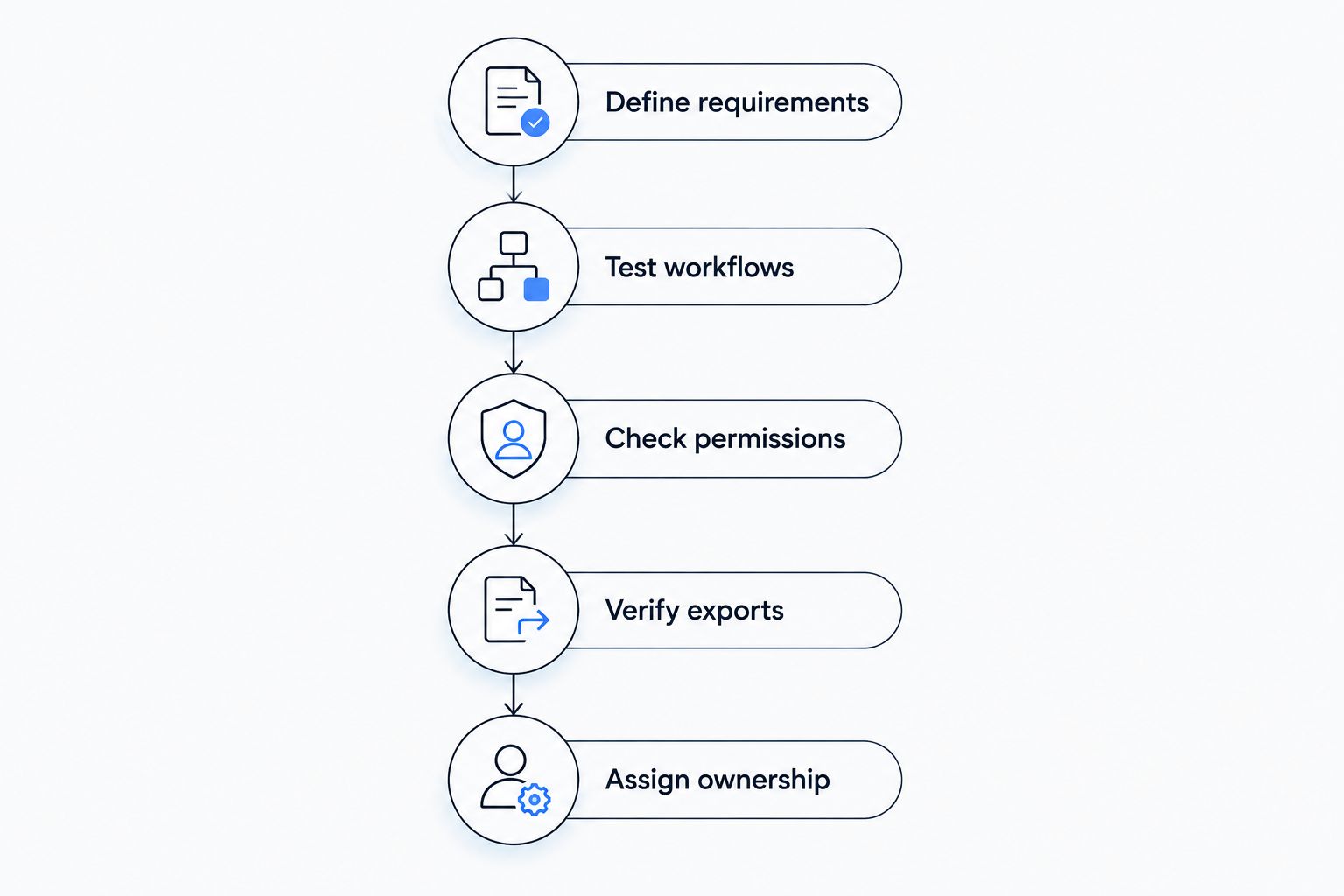
Define requirements
List essential workflows and identify who owns each one. Separate launch requirements from improvements that can wait. Require a clear reason for anything labelled essential.
Test workflows
Run an admission, an attendance correction, an assignment submission where relevant, and a student departure. Record whether staff completed the task and where they needed help.
Check permissions
Confirm that each role sees only the records and actions it needs. Test restricted actions directly; hiding a menu is not enough evidence of access control.
Verify exports
Export the pilot records and inspect the files. Check whether names, identifiers, class relationships, and relevant history remain understandable outside the application.
Assign ownership
Name the people responsible for configuration, training, updates, backups, and support escalation. Do not approve launch while those responsibilities remain unassigned.
Keep the results in a shared decision sheet. A failed essential workflow should remain visible until someone resolves it or formally changes the requirement; a polished demonstration should not erase it.
How these options are ranked
The ranking prioritizes administrative relevance, teaching fit, implementation responsibility, and the distinction between packaged software and custom development. It is a use-case shortlist, not a benchmark of measured performance or an Oman compliance certification.
Gibbon leads for an open-source administration brief. Moodle leads for teaching. Fedena serves the ERP-led evaluation route, while custom development belongs after a documented gap analysis.
Which school management software should you choose?
Start with Gibbon if you want an open-source administrative foundation. Run the acceptance test before committing to implementation. Shortlist Fedena alongside it when a packaged school ERP better matches your procurement approach.
Choose Moodle when the immediate need is course delivery and assessment, while retaining a separate answer for administration. Choose custom development only when you can explain precisely why existing systems fail your essential requirements.
For a 2026 decision, write a one-page selection record: chosen option, accepted limitations, unresolved dependencies, and named implementation owner. That document gives school leadership a clearer basis for approval than a feature checklist alone.
Define your school software requirements
Discuss a custom development brief based on your school's workflows, reporting, and integration needs.
FAQ
What's the best school management software for an Oman school?
Gibbon is the starting shortlist choice for a school seeking open-source administration. Compare it with Fedena for an ERP-led approach, then test your school's language, reporting, permissions, and data-export requirements.
Is Moodle a complete school management system?
Moodle is a learning management system, not a complete replacement for school administration. It supports courses, assignments, quizzes, and grades; admissions and financial administration need a separate solution.
Should our school choose open-source software or custom development?
Choose an existing open-source platform when configuration meets your essential workflows. Consider custom development when a documented gap cannot be resolved through practical configuration or integration.
How do we check Arabic support before choosing software?
Test Arabic throughout complete workflows using fictional records. Check data entry, names, search, reports, and the views used by staff and parents rather than checking only the interface language.
What should teachers test during a software demonstration?
Teachers should complete their actual attendance, classroom, assessment, and reporting tasks. Include a correction and a restricted action so the demonstration tests everyday work and permissions.
Can a school use Moodle alongside an administration platform?
Yes, a school can use a learning platform alongside an administration system. Define which system owns student records and how accounts, class membership, and departures stay aligned.
What should be agreed before migrating student records?
Agree on the source records, field mapping, validation rules, access permissions, and acceptance checks before migration. Use fictional data for the initial pilot and authorize access before handling real student information.
One last thing
Make a student departure part of the final demonstration. Ask staff to end access, preserve the required history, and export the record without removing information the school must retain. A system that handles enrollment well still needs to handle the end of that relationship correctly.