
Best overall: Zoho CRM. Best for marketing-led sales: HubSpot CRM. Best for pipeline-focused teams: Pipedrive. Best for a simpler setup: Bigin by Zoho. Fizmoh is best for GCC businesses that need custom CRM development rather than an off-the-shelf system.
- Zoho CRM is the default choice for CRM software for small businesses needing configurable sales workflows.
- HubSpot CRM suits marketing-led teams; Pipedrive suits businesses organized around sales opportunities.
- Bigin by Zoho suits straightforward pipelines; custom CRM development suits processes packaged software cannot accommodate.
- GCC buyers should verify Arabic workflows, permissions, integrations, and data requirements before choosing a CRM.
Why this matters
A CRM should make your next customer action clear. If your team still searches chats and spreadsheets to find the owner, status, and next step for an opportunity, the system has not solved the operational problem.
For a GCC business choosing in 2026, the decision extends beyond contact storage. Test the languages your staff use, the systems your business depends on, and the reporting your managers need. A feature list does not prove that those pieces work together.
Choose the smallest system that supports your real sales process. Add complexity only when a specific requirement justifies it.
What makes the best CRM software for small businesses?
Use these criteria before comparing demonstrations. They separate useful capability from features your team will never use.
- Daily usability: Sales staff should find a contact, record a conversation, and schedule the next action without unnecessary steps.
- Workflow fit: Your pipeline stages, ownership rules, and handoffs should reflect how your business sells.
- GCC operating requirements: Verify Arabic and English workflows where needed, regional business details, and relevant data-handling requirements.
- Connected records: Check how the CRM exchanges information with your website, email, accounting, and operational systems.
- Reporting and control: Managers need usable pipeline reports, appropriate access permissions, and a practical way to export business records.
- Implementation burden: Judge configuration, migration, training, and ongoing administration alongside the software itself.
A requirement is not satisfied because a salesperson says an integration exists. Ask for the exact workflow, including what happens when a record fails to sync or a customer changes their details.
Best small-business CRMs at a glance
This 2026 shortlist gives each option a distinct role. The final row is a development service, not a packaged CRM product.
| Option | Best for | Standout capability or approach | Key limitation |
|---|---|---|---|
| Zoho CRM | Configurable sales operations | Leads, deals, automation, and reporting in a configurable CRM | Setup needs clear ownership and process decisions |
| HubSpot CRM | Marketing-led sales | Connected contact records across marketing and sales tools | Required functions depend on the selected products and edition |
| Pipedrive | Opportunity-driven sales teams | A deal-centered visual sales pipeline | Broader business operations require separate systems or integrations |
| Bigin by Zoho | Straightforward customer pipelines | A simpler pipeline-focused approach | Less suitable when requirements demand extensive CRM configuration |
| Fizmoh custom CRM development | Business-specific workflows | Custom software development around defined requirements | Requires discovery, development, testing, and maintenance planning |
1. Zoho CRM: best CRM for configurable sales operations
Zoho CRM manages leads, contacts, deals, activities, and sales reporting. Its configuration and automation capabilities make it a practical starting point when a small business needs more structure than a basic contact list.
Best for: Businesses with defined sales stages, multiple responsibilities, and a need to adapt the CRM to their process.
A GCC services company, for example, can evaluate how the system handles qualification, proposal follow-up, and account ownership. Treat that as a demonstration scenario, not an assumption that the default setup already matches your operation.
Zoho CRM pros:
- Supports core lead and opportunity management.
- Offers workflow automation and reporting capabilities.
- Provides configuration options for business-specific records and processes.
Zoho CRM cons:
- Configuration creates administrative work rather than removing the need for it.
- Unclear stages and excessive required fields can make a flexible system difficult to use.
- Edition-specific features and integration requirements need checking before selection.
Start with the records and decisions your team actually needs. Adding every possible field makes the database larger without necessarily making the next sales action clearer.
Verdict: Buy if you need a configurable sales CRM and can assign someone to own its setup.
2. HubSpot CRM: best CRM for marketing-led sales
HubSpot connects CRM records with marketing, sales, and customer-service tools. It belongs on your shortlist when understanding how a lead moves from an enquiry to a sales conversation matters as much as tracking the deal itself.
Best for: Businesses where marketing and sales need shared contact context.
Ask the demonstration team to follow a website enquiry through assignment, follow-up, and qualification. Check which parts belong to your proposed configuration rather than assuming every demonstrated capability is included.
HubSpot CRM pros:
- Organizes contact and company information alongside sales activity.
- Connects CRM records with a wider set of marketing and service tools.
- Gives marketing and sales a shared record structure to evaluate.
HubSpot CRM cons:
- Requirements can span separate products and editions.
- Broader adoption requires agreement on ownership and lifecycle definitions.
- A connected suite does not automatically resolve inconsistent data entry.
Choose this approach when both departments will use the shared information. If marketing never records campaign context and sales never updates qualification, the shared system loses much of its purpose.
Verdict: Buy if marketing-to-sales handoffs are a central operating requirement.
3. Pipedrive: best CRM for opportunity-driven sales teams
Pipedrive centers sales work on deals, pipeline stages, and activities. That makes it a clear candidate when your main question is which opportunities need action next.
Best for: Teams that manage selling through a visible opportunity pipeline.
Use your own deal stages during evaluation. A polished sample pipeline tells you less than seeing how the system handles a stalled proposal, a reassigned opportunity, or a prospect with several open discussions.
Pipedrive pros:
- Uses a visual pipeline to organize opportunities.
- Connects sales activities with deal management.
- Keeps the evaluation focused on day-to-day selling tasks.
Pipedrive cons:
- A sales pipeline is not a substitute for accounting, HR, or inventory systems.
- Broader workflows require separate tools or integration planning.
- Poor stage definitions still produce unreliable pipeline reports.
Define the evidence required to move a deal forward. A stage called proposal sent should represent an actual customer-facing action, not a salesperson's expectation.
Verdict: Buy if opportunity ownership and follow-up discipline are your main priorities.
4. Bigin by Zoho: best CRM for straightforward pipelines
Bigin is Zoho's pipeline-focused CRM for small businesses. Evaluate it when you need organized customer records and follow-up without adopting a more configurable CRM environment.
Best for: Small teams with a straightforward process and limited administration needs.
The useful question is not whether the system has fewer features. It is whether those features cover the decisions your staff make every day.
Bigin by Zoho pros:
- Focuses on customer pipelines and associated activities.
- Offers a narrower starting point than a broader CRM implementation.
- Suits evaluation around a clearly defined sales process.
Bigin by Zoho cons:
- Complex requirements can exceed a simpler pipeline model.
- Specialist reporting and integration needs require close checking.
- Future migration still needs planning if your process becomes more demanding.
Test the exceptions, not just the normal path. If one customer regularly needs separate opportunities, different owners, and distinct handoffs, confirm that the proposed setup handles those relationships clearly.
Verdict: Buy if your workflow is simple; skip if extensive customization is already essential.
5. Fizmoh: best custom CRM route for business-specific workflows
This Muscat-based digital agency develops custom software, including CRM systems, for businesses across Oman and the GCC. Custom development is a different buying decision: you define the required system instead of selecting only from packaged functionality.
Best for: Businesses with documented workflows that standard CRM configurations cannot adequately support.
Consider this route when the gap is operational, not cosmetic. Examples of requirements to investigate include specialized approval paths, unusual customer relationships, and connections to existing business systems; these are scoping questions, not promised capabilities.
Fizmoh pros:
- Offers custom CRM development rather than only a packaged-product choice.
- Serves businesses across Oman and the GCC.
- Also offers ERP, POS, and HRMS development for businesses evaluating wider software needs.
Fizmoh cons:
- Custom development requires a written scope and acceptance criteria.
- Your team must make decisions about workflows, access, and reporting before delivery.
- Maintenance, documentation, and future changes need explicit agreement.
Do not commission software to preserve a broken process. First determine which steps protect revenue or reduce errors, and which exist only because the current spreadsheet requires them.
Verdict: Hold until you have documented a requirement that packaged software cannot reasonably meet.
How to validate your shortlist before committing
For your 2026 evaluation, use the same test script for every candidate. Comparable evidence is more useful than separate demonstrations designed around each vendor's strongest features.
Process map
Write the path from enquiry to customer. Name the owner and exit condition for every stage, then mark where information moves into another system.
Sample records
Create 10 sample leads using fictional customer details. Include a duplicate contact, an incomplete record, and an opportunity that needs reassignment so the demonstration covers exceptions.
Team trial
Ask 2 salespeople to complete the same tasks independently. Each should find a lead, log an interaction, change a stage, and identify the next action without the presenter taking control.
Data exit
Export the sample records and inspect the result. Check whether contact details, relationships, activities, and required fields remain understandable outside the application.
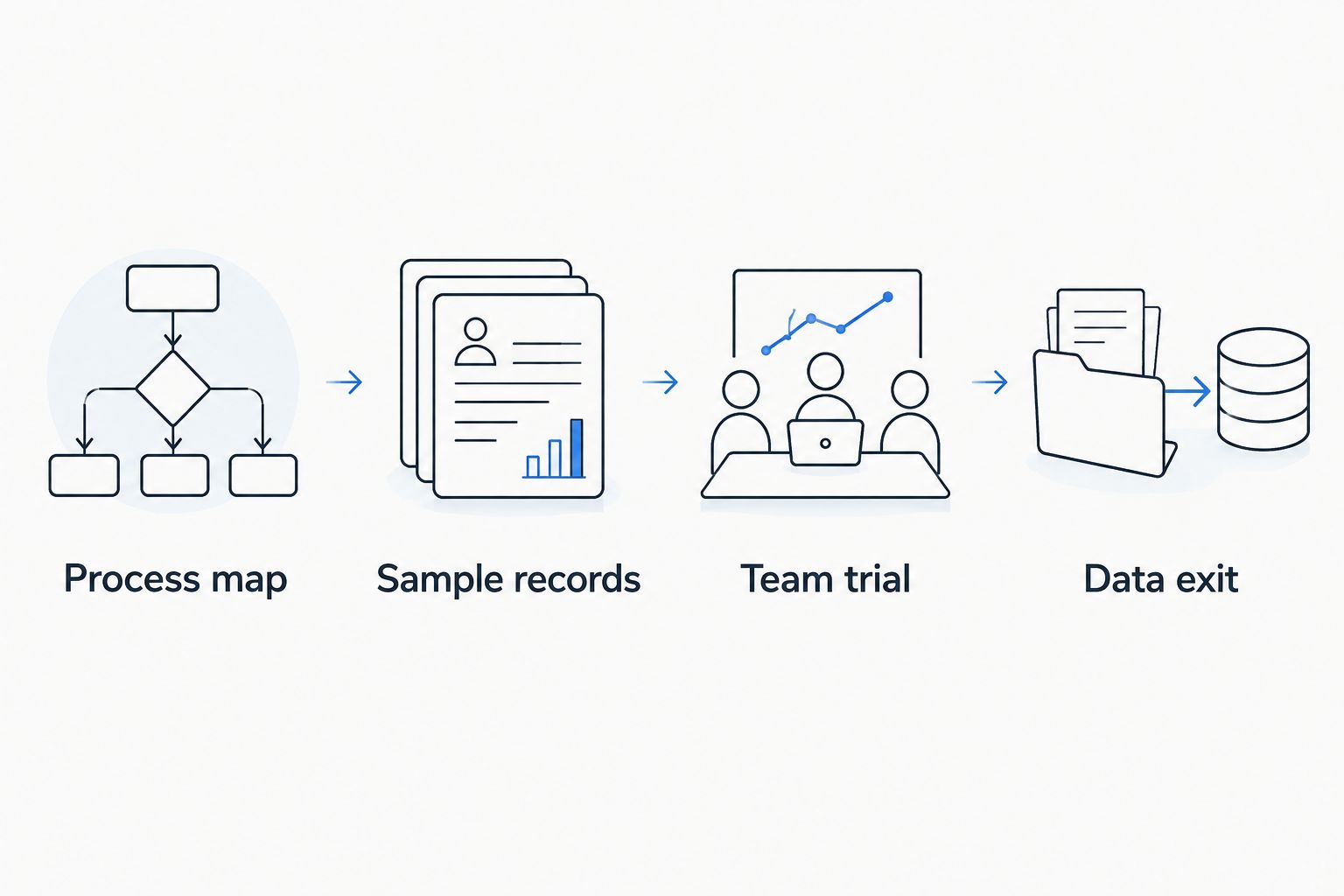
Set aside a 30-minute review after each trial to record unresolved requirements. These are suggested evaluation steps, not claims about implementation speed or vendor performance.
Check GCC requirements explicitly
Your 2026 requirements should reflect the countries where your business operates. GCC membership does not make every country's data rules, commercial practices, or operational needs identical.
- Language: Test Arabic entry, search, document output, and right-to-left presentation where your staff or customers require them.
- Communications: Demonstrate required email, calling, or messaging connections using the proposed configuration.
- Permissions: Verify who can view, edit, export, reassign, and delete customer information.
- Data handling: Confirm hosting arrangements, access controls, contractual responsibilities, and applicable legal requirements with qualified advisers.
A CRM is not an accounting system simply because it stores a deal value. Confirm which system owns invoices, customer balances, and financial reporting before connecting them.
How we ranked these CRM options
The ranking prioritizes workflow fit, usability, connected records, reporting, GCC operating requirements, and implementation burden. It is a use-case recommendation, not a claim that every product underwent a hands-on benchmark.
Zoho CRM takes the default position for configurable sales operations. The remaining choices address distinct needs: marketing coordination, opportunity management, simpler pipelines, and custom development.
For 2026, use the ranking to build a shortlist, then let your own trial determine the purchase. Product names alone do not establish fit.
Which CRM should you choose?
Start with Zoho CRM if you are undecided and need configurable sales management. Compare it with Bigin when simplicity matters more than extensive configuration.
Choose HubSpot CRM when shared marketing and sales context drives the decision. Choose Pipedrive when the daily priority is managing opportunities and next actions.
Reserve custom development for a documented process gap. Do not build a system merely because your existing records need cleaning or your team has not agreed on sales stages.
FAQ
What's the best CRM software for small businesses in the GCC?
Zoho CRM is the default recommendation for small businesses needing configurable sales management. HubSpot CRM, Pipedrive, and Bigin suit different operating priorities; validate your choice against real workflows.
Is HubSpot CRM better than Zoho CRM?
HubSpot CRM is the stronger shortlist choice when connecting marketing and sales is the main requirement. Zoho CRM is the default recommendation here for configurable sales operations; compare the exact editions and workflows you need.
Should a small business choose Bigin or Pipedrive?
Choose Bigin to evaluate a straightforward customer pipeline, and Pipedrive to evaluate a deal-centered sales workflow. Run the same tasks in both rather than choosing from feature lists alone.
Does a business in Oman need an Arabic CRM?
A business in Oman needs Arabic CRM workflows when its staff, customer communications, or documents require them. Test entry, search, output, and right-to-left presentation separately rather than assuming one language setting covers everything.
When should a small business build a custom CRM?
Build a custom CRM when documented requirements cannot reasonably be met through packaged software and configuration. Agree on acceptance criteria, data export, documentation, and maintenance before development starts.
Can CRM software replace accounting software?
CRM software should not be treated as a replacement for accounting software. Define which system owns invoices, balances, and financial reporting, then verify how information passes between them.
How should a business compare CRM systems in 2026?
Compare CRM systems in 2026 using the same sample records, tasks, and reporting requirements. Include reassignment, duplicate handling, permissions, and data export so the trial tests more than the normal sales path.
One last thing
Test the exit before committing to the entry. Exporting customer records during evaluation reveals whether your business can understand and reuse its information outside the CRM.
Make that a purchase condition in 2026. A clear pipeline matters, but so does keeping usable control of the customer history behind it.