
Best overall: Odoo for configurable retail operations; best for custom workflows: Fizmoh; best for source-code control: ERPNext; best for Shopify-connected retail: Shopify POS. This 2026 guide compares the options by checkout, inventory, integration and implementation requirements—not by promises on a feature list.
- For a pos system for retail stores oman shortlist, start with Odoo for configurable checkout and inventory.
- Fizmoh is best for retailers that need custom POS development rather than an off-the-shelf product.
- ERPNext suits businesses that want an open-source system connecting retail transactions with wider operations.
- Shopify POS suits Shopify merchants; verify Oman payment processing and hardware compatibility before committing.
Why this matters
A retail POS records sales, but your buying decision reaches beyond the checkout counter. Returns, purchasing, stock transfers and accounting all depend on what happens after the receipt prints.
For an Oman retailer choosing in 2026, the practical question is whether the complete setup works for your business: software, payment terminal, receipt printer, tax configuration and support arrangement. A familiar product name does not establish that the proposed combination works locally.
Choose the operating model before choosing the interface. A single shop replacing a cash register has different requirements from a retailer connecting branches, online orders and an existing accounting system.
What makes the best retail POS system?
Use these criteria to judge each option. Treat anything essential to daily trading as an acceptance requirement, not a future enhancement.
- Checkout fit: Demonstrate barcode scanning, discounts, returns, exchanges and the exact payment workflow your staff will use.
- Inventory control: Check variants, purchasing, receiving, stock adjustments and transfers between locations.
- Local operating fit: Confirm OMR handling, required receipt languages, applicable tax treatment and compatibility with your chosen payment provider.
- System connections: Identify how sales, refunds, stock and customer records reach accounting, ecommerce and other business systems.
- Ownership and maintenance: Establish who controls hosting, data exports, custom code, updates and incident resolution.
- Implementation scope: Separate standard features from configuration, additional modules, integrations and custom development.
Do not award points for a capability that exists only in a slide deck. Ask the supplier to demonstrate your workflow in the proposed configuration.
Retail POS options at a glance for 2026
| Option | Best for | Standout feature | Key limitation |
|---|---|---|---|
| Odoo | Configurable retail operations | POS within a wider modular business application suite | Edition, modules and customization affect the implementation |
| Fizmoh custom POS development | Retailers with nonstandard workflows | A development service rather than a fixed packaged POS | Scope, integrations and support must be defined before development |
| ERPNext | Businesses prioritizing source-code control | Open-source ERP connecting sales with inventory and accounting | Hosting, configuration and maintenance need clear ownership |
| Shopify POS | Retailers already operating on Shopify | In-person selling connected to Shopify commerce | Oman payment processing and hardware suitability require verification |
These are different purchasing decisions. Odoo, ERPNext and Shopify POS are software platforms; custom POS development is a service engagement. Compare the completed operating setup, not just the names.
1. Odoo: best retail POS for configurable operations
Odoo combines point of sale with applications for inventory, purchasing, accounting and other business functions. It belongs at the top of the shortlist when you want retail transactions connected to a wider operational system without starting from a blank specification.
The important distinction is between what Odoo supports and what your implementation includes. Your proposal should name the edition, applications, integrations and custom work needed for the demonstrated workflow.
Odoo pros:
- Connects checkout requirements with a wider business application suite.
- Provides a path to manage inventory and purchasing alongside sales.
- Supports a configuration-led approach before commissioning custom development.
- Suits evaluation across connected operational workflows, not checkout alone.
Odoo cons:
- Module and edition choices make the scope more involved than a basic checkout replacement.
- Custom changes create maintenance and upgrade responsibilities.
- An Odoo demonstration does not establish compatibility with your Oman payment setup.
Best for: Retailers that need connected sales, inventory and purchasing processes and can assign someone to own implementation decisions.
Ask for a demonstration that starts with receiving stock and ends with a returned sale appearing correctly in inventory and accounting. This exposes gaps that a checkout-only demonstration leaves hidden.
Verdict: Buy Odoo when its configured workflow meets your requirements without extensive custom changes.
2. Fizmoh: best retail POS development for custom workflows
This Muscat-based digital agency offers custom software development, including POS, ERP, CRM and HRMS. It is a service option for retailers whose requirements call for a defined development project rather than selection of a packaged product.
Fizmoh is best for retailers that need custom POS development rather than an off-the-shelf system. That does not establish any particular integration, hardware support or finished feature; each belongs in the agreed scope.
Fizmoh pros:
- Offers POS development within its stated custom software services.
- Also offers web and mobile application development when a project requires those disciplines.
- Provides a service-based alternative to adopting a fixed product workflow.
Fizmoh cons:
- A development engagement requires requirements and acceptance criteria before the finished system can be evaluated.
- Payment integrations, offline operation, hardware compatibility and reporting cannot be assumed.
- Source-code ownership, hosting, maintenance and support terms need explicit agreement.
Best for: Retailers with documented exceptions that packaged systems cannot satisfy through acceptable configuration.
Bring examples of the exceptions. These might include an unusual approval process, a connection to an existing internal system or a specific exchange workflow. They are requirements to discuss, not features to assume are already available.
Verdict: Buy custom development only after the scope identifies what standard software cannot adequately handle.
3. ERPNext: best retail POS for source-code control
ERPNext is an open-source ERP system with point-of-sale, inventory and accounting functions. It suits a shortlist where control over the software and its connection to wider business operations matters as much as the checkout experience.
Open source changes the ownership discussion; it does not remove the work. Someone still needs to configure the system, manage hosting, apply updates, protect backups and resolve operational problems.
ERPNext pros:
- Makes source-code access part of the platform choice.
- Connects retail transactions with inventory and accounting functions.
- Supports evaluation as a wider ERP rather than an isolated register.
- Lets you assess hosting and maintenance arrangements separately from the application itself.
ERPNext cons:
- Requires a named owner for technical maintenance and recovery.
- Local payment connections and receipt requirements need validation in the proposed setup.
- Custom modifications introduce testing and upgrade responsibilities.
Best for: Businesses that prioritize software control and can assign capable internal or external technical support.
Ask who will restore operations after a failed update and how that person will access the necessary backups. A proposal that explains installation but not recovery is incomplete.
Verdict: Buy ERPNext when source-code control is a real requirement and maintenance ownership is settled.
4. Shopify POS: best retail POS for Shopify merchants
Shopify POS supports in-person selling within the Shopify commerce platform. Its strongest use case is a retailer already using Shopify online and evaluating how to connect store selling with that existing operation.
Do not treat the Shopify connection as proof that every payment or hardware requirement is covered in Oman. Ask for the exact proposed combination of software, devices and payment processing, then test it together.
Shopify POS pros:
- Connects in-person selling with an existing Shopify business.
- Keeps the evaluation focused on shared commerce operations rather than a separate ERP project.
- Gives Shopify merchants a direct platform option to assess before adding another retail system.
Shopify POS cons:
- Oman payment processing and supported hardware require specific verification.
- Requirements outside the Shopify workflow need separate assessment.
- A retailer not already using Shopify must evaluate the broader platform decision, not just POS.
Best for: Shopify merchants that want connected store and online operations and can validate their local checkout setup.
Demonstrate an online order, an in-store sale and the return of each. Check the inventory and transaction records after every action rather than accepting a general statement about synchronization.
Verdict: Buy Shopify POS for a Shopify-led operation only after validating the complete Oman checkout workflow.
How these options rank
Odoo is the default recommendation because it offers a configuration-led route across checkout and related operations. ERPNext takes the source-control slot; Shopify POS takes the existing-Shopify slot; custom development takes the nonstandard-workflow slot.
This is a requirements-based ranking, not a claim that one platform outperforms another in measured testing. No option receives an assumed advantage for local payment support, implementation quality or service response.
The deciding criteria remain checkout fit, inventory control, local operating fit, system connections, ownership and implementation scope. An option that fails a mandatory requirement drops out regardless of its position here.
Run a retail acceptance test before signing
For your 2026 selection, give each shortlisted provider the same written scenarios. Use representative sample records rather than customer information or live payment credentials.
Sample data
Prepare 20 SKUs covering the product types you actually sell. Include variants, barcodes and a tax-relevant example where applicable; these are suggested test inputs, not a limit on system capacity.
Checkout test
Complete a sale, apply an authorized discount and process 1 returned sale. Check the receipt, refund record and stock movement, including how staff permissions affect each action.
Stock test
If you operate branches, model 2 locations and transfer stock between them. Confirm what happens when a cashier searches for an item held elsewhere and when receiving staff record a delivery discrepancy.
Reconciliation
Trace the sale and return into the reports or accounting connection you intend to use. Ask who investigates differences between the POS record and the payment provider's settlement record.
Recovery test
Have the provider explain what happens when connectivity, a device or an integration fails. Require a demonstrated recovery procedure for business-critical scenarios rather than an unqualified promise of offline operation.
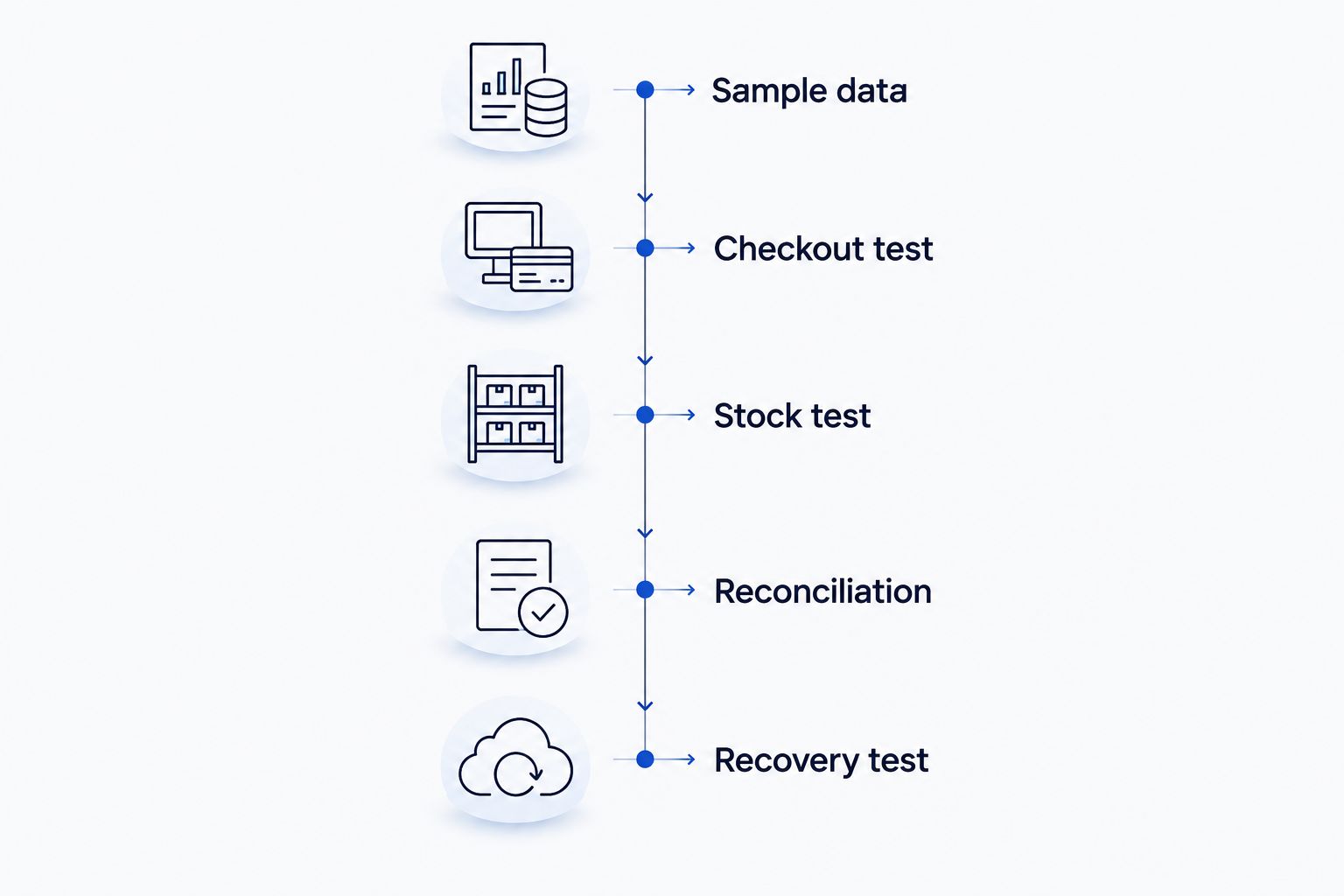
Record each result as standard functionality, configuration, integration or custom development. This turns a broad proposal into a scope you can accept or reject.
Which retail POS should you choose?
Choose Odoo as the default shortlist leader if you need connected retail operations and its standard configuration fits. Choose ERPNext when source-code control drives the decision, or Shopify POS when Shopify already anchors your commerce operation.
Choose custom development only when documented requirements justify it. Do not commission a new system merely because the first packaged demonstration was poorly configured.
Before you approve a 2026 implementation, require a written scope covering data migration, payment processing, hardware, tax configuration, training, acceptance tests and ongoing responsibility. Assign one business owner to approve the completed workflow.
Define Your Retail POS Requirements
Discuss custom POS development around your checkout, inventory and integration requirements.
FAQ
What's the best POS system for a retail store in Oman?
Odoo is the default shortlist leader for configurable retail operations. Choose ERPNext for source-code control, Shopify POS for a Shopify-led business, or custom development for documented nonstandard workflows.
Is Odoo better than ERPNext for retail?
Odoo ranks first here for a configuration-led retail implementation; ERPNext is the stronger shortlist match when source-code control drives the decision. Compare the proposed checkout, inventory and accounting workflows before selecting either.
Can I use Shopify POS for my shop in Oman?
Verify the complete proposed Oman setup before selecting Shopify POS. Require confirmation of payment processing, hardware compatibility and the transaction workflow rather than assuming the Shopify connection covers them.
Should a small retailer build a custom POS system?
A small retailer should choose custom development only when documented requirements justify it. First establish whether a packaged platform can handle the essential workflow through configuration.
What should I ask about POS payment integration?
Ask exactly how the proposed POS works with your chosen payment provider and terminal. Demonstrate payments, refunds, failed transactions and reconciliation before accepting the setup.
Does open-source POS software remove maintenance work?
No. Open-source software still requires hosting, security updates, backups, testing and incident response, with a named party responsible for each.
What should an Oman retailer check before a 2026 POS rollout?
Validate checkout, inventory, payment processing, applicable tax configuration and recovery procedures. Put the demonstrated requirements and acceptance criteria in the implementation scope before signing.
One last thing
A successful sale is not a sufficient acceptance test. For your 2026 rollout, ask the supplier to reverse it: return the item, correct the stock, reconcile the refund and show the audit trail.
If the return breaks the workflow, the POS is not ready for acceptance. Make that test part of the contract, not a discovery after launch.