
Best overall for stock-led retail: Zoho Inventory; best for connected business operations: Odoo; best for bespoke development requirements: Fizmoh. This 2026 guide compares inventory management software Oman retailers can shortlist, including packaged software, open-source systems, and custom development.
- For inventory management software Oman retailers can shortlist, Zoho Inventory suits stock-led purchasing and fulfillment workflows.
- Odoo suits retailers choosing inventory as part of a wider ERP system.
- ERPNext suits businesses that want open-source software and can assign technical ownership.
- Fizmoh suits businesses seeking custom ERP or POS development rather than an off-the-shelf subscription.
- Test returns, branch transfers, accounting handoffs, and language requirements before choosing.
Why this matters
Inventory software must explain what you own, where it sits, and why the balance changed. A checkout screen alone does not answer those questions. Neither does an accounting balance without the underlying stock movements.
For an Oman retailer choosing software in 2026, the decision starts with operating requirements: store locations, sales channels, purchasing, returns, and financial reporting. Treat Arabic requirements, Oman tax configuration, and local implementation support as checks to complete—not benefits to assume from a product name.
Choose the system that handles your stock exceptions, not the one with the longest feature list. A convincing demonstration follows a damaged return or an incomplete delivery through to the final stock balance.
What makes the best inventory management software?
Use these criteria to assess every option before discussing implementation:
- Stock traceability: Every receipt, sale, return, adjustment, and transfer needs a recorded reason and responsible user.
- Purchasing control: Demonstrate purchase orders, partial receipts, supplier returns, and replenishment decisions using your workflow.
- Channel fit: Establish how store sales and online orders update inventory, including cancellations and returned goods.
- Financial handoff: Confirm how stock movements reach accounting and who resolves discrepancies.
- Local requirements: Test required languages, invoice fields, tax treatment, and document formats with your accountant.
- Operational ownership: Assign responsibility for item data, permissions, integrations, backups, and updates.
Separate mandatory requirements from preferences. If branch transfers are essential, a system that fails that demonstration does not belong on your final shortlist, regardless of its other features.
Inventory software options at a glance
These 2026 recommendations match different implementation needs. They are not a ranking of measured performance or a claim that every edition includes every capability.
| Option | Best for | Standout approach | Key limitation |
|---|---|---|---|
| Zoho Inventory | Stock-led purchasing and fulfillment | Dedicated inventory application | Store checkout requirements need separate assessment |
| Odoo | Connected retail operations | Inventory within a broader business application suite | Scope and configuration need firm control |
| ERPNext | Open-source ERP ownership | Inventory within an open-source ERP | Technical administration needs an accountable owner |
| Shopify POS | Retail built around Shopify | Store checkout connected to Shopify commerce | Broader ERP requirements need separate assessment |
| Fizmoh custom development | Bespoke ERP or POS requirements | Custom software development | Inventory scope and acceptance criteria must be specified |
No single option wins every use case. Choose the row that matches your operating model, then use the same transaction script to test the shortlist.
1. Zoho Inventory: best for stock-led retail workflows
Zoho Inventory is a dedicated inventory application covering purchasing, stock tracking, sales orders, and fulfillment. It belongs on your shortlist when the main problem is controlling goods rather than replacing every business system.
For an Oman retailer evaluating options in 2026, start the demonstration with receiving and replenishment. Then establish how your checkout, online store, and accounting setup would connect. A dedicated inventory application is not automatically the complete retail stack.
Zoho Inventory pros:
- Keeps the evaluation focused on stock and order operations.
- Covers purchasing and sales-order workflows in a dedicated application.
- Provides an alternative to adopting a broader ERP solely for inventory.
Zoho Inventory cons:
- Your checkout workflow still needs its own assessment.
- Required integrations and edition-specific features need confirmation.
- Existing item records need cleaning before migration.
Best for: Retailers whose primary requirement is purchasing, stock visibility, and fulfillment control.
Ask the demonstrator to receive an incomplete supplier delivery and leave the purchase order correctly outstanding. Follow that with a customer return. Check the stock record rather than accepting a successful-looking screen.
Verdict: Buy only after your sales-channel and accounting handoffs pass the demonstration.
2. Odoo: best for connected retail operations
Odoo offers business applications that include inventory, purchasing, accounting, and point of sale. Its appeal is the ability to evaluate stock alongside the surrounding business processes rather than as an isolated function.
That wider scope requires discipline. Write down which applications belong in the initial implementation and which remain outside it. Otherwise, an inventory project becomes an open-ended business-system replacement.
Odoo pros:
- Lets you assess inventory alongside related business applications.
- Supports a broader ERP approach when purchasing and finance also need attention.
- Offers a path beyond a standalone stock application.
Odoo cons:
- A wider application scope creates more configuration decisions.
- Edition and deployment choices affect the implementation plan.
- Custom changes require an explicit maintenance and upgrade plan.
Best for: Retailers replacing disconnected operational systems, not just a stock spreadsheet.
For your 2026 shortlist, request a connected demonstration: purchase goods, receive them, sell them, process a return, and inspect the financial handoff. Record any step that depends on additional configuration or another application.
Verdict: Buy when the wider ERP scope is necessary and a named owner controls implementation.
3. ERPNext: best for open-source ERP ownership
ERPNext is an open-source ERP with stock, purchasing, sales, and accounting functions. It suits an evaluation where control over the software and its administration forms part of the business requirement.
Open-source access does not remove implementation work. You still need decisions about hosting, permissions, backups, updates, data migration, and support. Assign those responsibilities before selecting a deployment approach.
ERPNext pros:
- Provides inventory within an open-source ERP.
- Allows purchasing, sales, stock, and accounting to be assessed together.
- Makes software control a practical part of the selection discussion.
ERPNext cons:
- Hosting and maintenance need an accountable technical owner.
- Customizations create ongoing testing and documentation work.
- Retail checkout requirements need a separate operational demonstration.
Best for: Businesses with internal technical ownership or an implementation partner responsible for administration.
Request a restore demonstration as well as a sales demonstration. A backup policy is incomplete until the responsible team can explain how it restores business data and checks the result.
Also establish who approves updates and who tests custom workflows afterward. Those are operating responsibilities, not tasks that end at launch.
Verdict: Buy when software ownership is intentional; skip when nobody owns maintenance.
4. Shopify POS: best for Shopify-centered retail
Shopify POS connects in-person selling with Shopify commerce. It belongs on the shortlist when Shopify is already central to your online operation or is the commerce platform you intend to adopt.
Start with the customer journey across channels. Demonstrate an online order, an in-store sale, and a return, then inspect the resulting inventory records. Do not treat commerce integration as proof that every purchasing or warehouse requirement is covered.
Shopify POS pros:
- Connects store checkout with the Shopify commerce environment.
- Keeps the evaluation centered on online and in-person retail.
- Offers a relevant starting point for an existing Shopify operation.
Shopify POS cons:
- Broader ERP requirements need separate assessment.
- Payment processing and hardware suitability in Oman require confirmation.
- Additional applications introduce dependencies that need documenting.
Best for: Retailers organizing store operations around Shopify commerce.
Before committing in 2026, verify the payment setup, hardware, receipt requirements, and accounting connection for your actual Oman operation. Treat written confirmation and a working demonstration as separate requirements.
Verdict: Buy for Shopify-centered retail after local checkout requirements pass; skip for an unrelated ERP replacement.
5. Fizmoh: best for bespoke ERP or POS development
Fizmoh provides custom software development, including ERP and POS, alongside web and mobile application development. This is a development-service option, not a named inventory software subscription.
Fizmoh is best for retailers seeking custom ERP or POS development rather than an off-the-shelf inventory product. Bring documented workflows and exceptions to the scoping discussion. Define inventory functions as project requirements, not assumed features.
Fizmoh custom development pros:
- Gives businesses a service route for specifying custom ERP or POS requirements.
- Allows the brief to address workflows that packaged-system demonstrations leave unresolved.
- Provides a basis for discussing related web or mobile development within the project scope.
Fizmoh custom development cons:
- Inventory functions require explicit specification and acceptance testing.
- Delivery, maintenance, ownership, and support terms need agreement.
- Unusual workflows do not automatically justify building custom software.
Best for: Retailers with documented requirements that packaged systems fail to meet acceptably.
List each unresolved requirement, the business consequence, and the expected behavior. Ask for a proposed scope against that list. Do not begin with a vague instruction to build a complete retail system.
Verdict: Buy custom development only when the workflow gap is documented and the project scope is agreed.
Test the shortlist with one stock journey
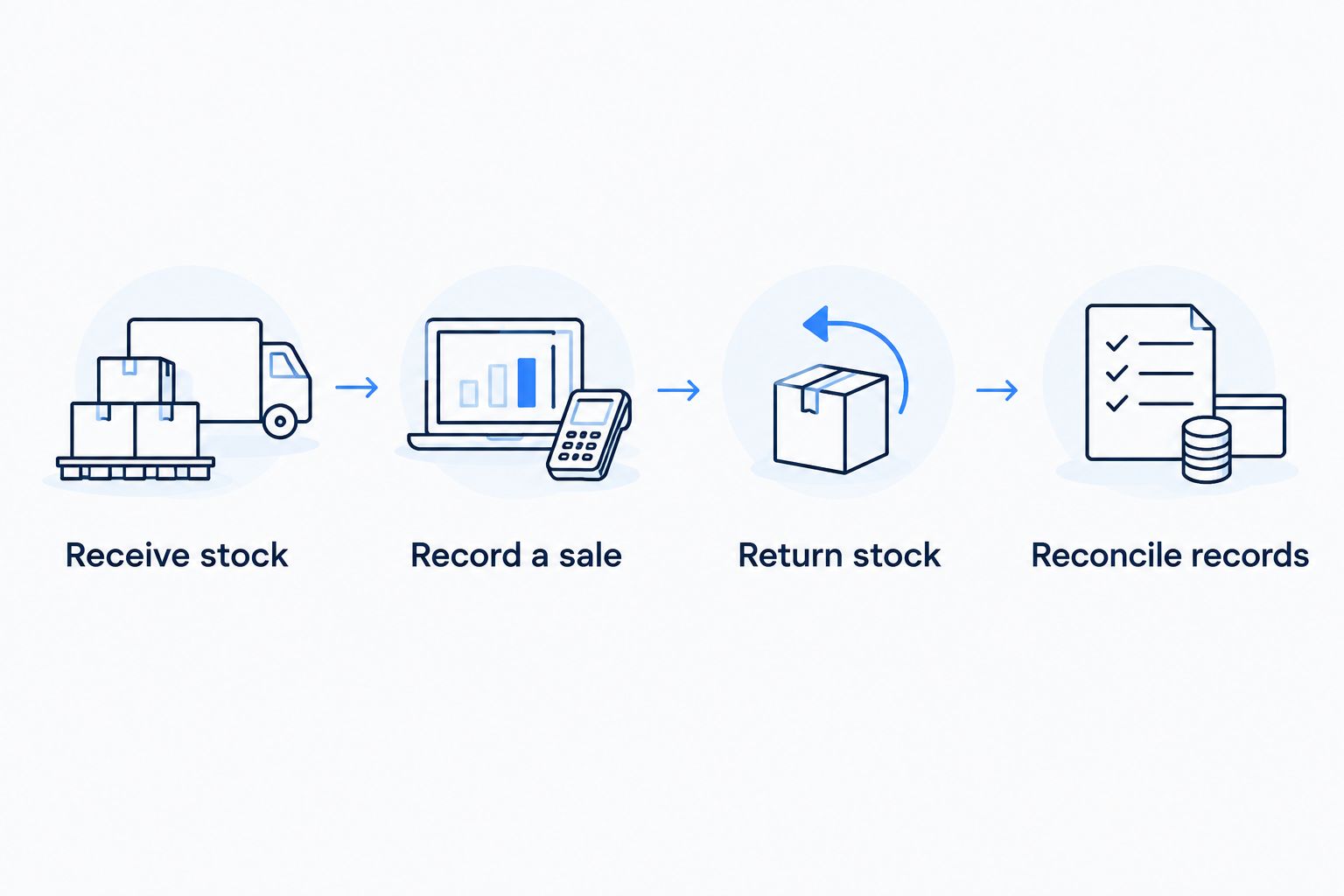
Use the same acceptance script for every 2026 demonstration. These quantities are test inputs, not performance benchmarks:
- Receive stock: Start with an empty test item and receive 10 units against a purchase order.
- Record a sale: Sell 3 units and confirm that 7 units remain.
- Return stock: Return 1 resellable unit and confirm that 8 units remain.
- Reconcile records: Inspect the movement history, user record, and relevant accounting handoff.
The arithmetic is simple. The important question is whether every movement remains explainable without an undocumented correction. Repeat the script with a damaged return and a branch transfer if those transactions belong to your operation.
Have the employee responsible for daily stock control perform the test. A demonstration run entirely by the presenter does not show whether your staff can complete the workflow or identify a mistake.
How the options are ranked
The ranking follows operating fit: dedicated inventory first, connected ERP next, open-source ownership after that, followed by Shopify-centered checkout and bespoke development. The criteria are stock traceability, purchasing, channels, financial handoff, local requirements, and operational ownership.
This is a requirements-based shortlist, not a hands-on performance score. No recommendation replaces checking the relevant edition, deployment, integrations, and Oman-specific requirements with the provider or implementation team.
Before approval, record:
- Scope: Included workflows and explicit exclusions.
- Responsibility: Owners for migration, configuration, training, and support.
- Acceptance: Transactions that must pass before launch.
- Continuity: Data export, backup, recovery, and exit arrangements.
Which inventory software should you choose?
Start with Zoho Inventory if your immediate problem is purchasing and stock control. Start with Odoo if inventory is part of a wider operational replacement. Choose ERPNext for intentional open-source ownership, and assess Shopify POS when Shopify is the center of your retail operation.
Consider custom development only after recording where packaged systems fail your requirements. That keeps the decision tied to business needs rather than a preference for building software.
Your final approval should name the selected system, the implementation owner, and the acceptance script. A product shortlist without those decisions is not an implementation plan.
FAQ
What's the best inventory management software for Oman retailers in 2026?
Zoho Inventory is the starting recommendation for retailers focused on purchasing, stock tracking, and fulfillment. Odoo fits a wider ERP evaluation, while Shopify POS fits Shopify-centered retail. Confirm local requirements before selection.
Is Odoo better than Zoho Inventory for a retail business?
Odoo is the stronger shortlist choice when inventory belongs within a wider business-system replacement. Zoho Inventory is the more focused starting point when stock and order operations are the main requirement. Test the same transactions in both.
Can ERPNext handle inventory management?
ERPNext includes stock management within its open-source ERP. The selection still requires decisions about hosting, configuration, maintenance, and technical ownership. Demonstrate your checkout and accounting workflows before approval.
Does an Oman retailer need POS software or inventory software?
An Oman retailer needs POS for checkout and inventory functions for stock control. Those functions can sit in a connected system or separate applications. Test how sales, returns, and cancellations change stock balances.
What should I check before using Shopify POS in Oman?
Confirm the payment setup, hardware suitability, receipt requirements, and accounting connection for your Oman operation. Then demonstrate online and in-store transactions using the proposed configuration. Do not assume every regional requirement is included.
When should a retailer choose custom inventory development?
Choose custom development when documented business requirements remain unresolved after assessing packaged systems. Specify the required inventory behavior, acceptance tests, and maintenance responsibilities before agreeing to a project.
Do I need Arabic support in inventory software?
You need Arabic support wherever your staff, customers, or required documents depend on it. Test the interface, item descriptions, search, receipts, and reports separately. Support in one part of a system does not establish support everywhere.
One last thing
Test a stock correction before signing. Ask an employee to enter an incorrect receipt quantity, correct it through the approved process, and show the history afterward. A system that records the original movement and its correction gives you a clearer basis for investigating discrepancies than an unexplained edited balance.