
Best overall approach: HRMS-led payroll for connected employee records and pay processing. Best for finance-led operations: ERP-connected payroll. Best for unusual workflows: custom HRMS development. This 2026 guide compares implementation routes for companies evaluating payroll software in Oman, with checks to complete before choosing a system.
- Payroll software Oman: start with HRMS-led payroll when employee records, leave, and salary processing need one workflow.
- Choose ERP-connected payroll when finance needs payroll journals connected to the accounting system.
- Fizmoh offers custom HRMS development; consider that service when standard workflows do not fit.
- Require demonstrations of Oman-specific calculations and bank requirements before selecting any payroll system.
Why this matters
Payroll selection is a workflow decision before it is a software decision. Your team must turn employment records, attendance, approved changes, and deductions into a reviewed payroll run and a usable payment output.
A missing connection creates another manual handoff. A payroll screen alone does not tell you whether HR, finance, and the person approving payment can complete their work without rebuilding spreadsheets.
Fizmoh provides custom HRMS and ERP development. Treat that as a development service to assess against your requirements, not as evidence of a ready-made Oman payroll product.
For your 2026 shortlist, start with the operational problem: disconnected employee data, accounting reconciliation, repetitive calculations, or rules that standard software cannot represent. Choose the route that resolves that problem without adding unnecessary system ownership.
What makes the best payroll software for Oman?
Use these criteria before comparing demonstrations. Each criterion should produce evidence you can inspect, not a promise in a sales presentation.
- Payroll rules: Demonstrate your actual earnings, deductions, leave treatment, and applicable employee categories. Validate the configuration against current requirements with your payroll adviser.
- Bank output: Ask your bank which payment format and submission requirements apply. Require the proposed system to produce an output the bank can accept.
- Employee records: Show how contracts, salary changes, attendance, and leave reach payroll without conflicting versions.
- Approval controls: Identify who prepares, checks, approves, and releases payroll. Confirm that access permissions reflect those responsibilities.
- Audit history: Require a traceable record of input changes, approvals, calculation changes, and final outputs.
- System ownership: Name the people responsible for configuration, updates, support, data exports, and corrections after launch.
Do not accept an unqualified statement that a product is Oman-ready. Ask which requirements are covered, which depend on configuration, and which remain your responsibility.
Payroll implementation routes at a glance
These are ranked buying routes, not a claim that named software products have been tested. The order prioritizes connected HR workflows, then finance integration, then specialized requirements.
| Rank and option | Best for | Standout approach | Key limitation |
|---|---|---|---|
| 1. HRMS-led payroll | Businesses connecting HR records to pay processing | Employee changes feed a shared payroll workflow | Accounting integration still needs verification |
| 2. ERP-connected payroll | Finance-led businesses | Payroll results connect to accounting processes | Broader implementation scope |
| 3. Custom HRMS development | Businesses with documented workflow exceptions | Development follows the agreed requirements | Requires ongoing technical ownership |
| 4. Standalone payroll | Businesses with a narrow payroll requirement | Focused calculation and payroll administration | Separate HR records can create duplicate work |
| 5. Enterprise payroll architecture | Groups with complex organizational controls | Payroll designed around entity and governance requirements | More coordination and configuration |
1. HRMS-led payroll: best for connected employee records
HRMS-led payroll places employee information and payroll inputs within a connected HR workflow. It is the default route to assess when salary changes, leave records, and attendance currently move between separate files.
The practical question is whether an approved HR change reaches the correct payroll period. A shared interface is not enough; the demonstration must show how the underlying records connect.
HRMS-led payroll pros:
- Connects employee changes with the payroll process.
- Gives HR and payroll a shared record to review.
- Supports a clearer handoff between leave approval and pay calculation.
HRMS-led payroll cons:
- Accounting outputs still require a separate integration check.
- Incorrect employee records can carry into payroll calculations.
- Features outside payroll can expand the implementation workload.
Best for: Companies whose payroll problems begin with inconsistent HR records rather than calculation alone.
For a 2026 evaluation, ask the supplier to demonstrate a salary change approved after the payroll cutoff. Confirm which period receives the change, who sees it, and how the audit history records the decision.
Verdict: Buy only after employee changes, payroll calculations, and accounting outputs pass your acceptance tests.
2. ERP-connected payroll: best for finance-led operations
ERP-connected payroll connects payroll results with the wider finance system. Assess this route when finance needs payroll journals, departmental allocations, and reconciliation to follow an established accounting structure.
The value lies in the accounting handoff, not the ERP label. A system that calculates pay correctly but produces unusable journals leaves finance with another manual task.
ERP-connected payroll pros:
- Connects payroll outputs with accounting processes.
- Provides a route for allocating payroll across departments or cost centers.
- Lets finance assess reconciliation within the broader system design.
ERP-connected payroll cons:
- Implementation touches more than the payroll team.
- Changes to account mappings need controlled ownership.
- A broad ERP project can delay a narrower payroll requirement.
Best for: Businesses where payroll reconciliation and accounting integration are the main sources of rework.
Ask for a demonstration from approved payroll through to the resulting journal. Finance should verify account mapping, allocation rules, rounding treatment, and the correction process before accepting the design.
Verdict: Buy when accounting integration is a primary requirement, not simply because payroll appears on an ERP feature list.
3. Custom HRMS development: best for documented exceptions
Custom HRMS development starts with your requirements rather than a fixed product workflow. Consider this route when you can identify specific rules, approvals, or integrations that configurable systems do not meet.
Fizmoh is best suited to businesses seeking custom HRMS development rather than an off-the-shelf payroll subscription. Its stated services include custom HRMS and ERP development; payroll scope, integrations, and acceptance requirements need explicit agreement.
Custom HRMS development pros:
- Lets you define the required workflows before development.
- Makes integration requirements part of the project scope.
- Allows acceptance tests to follow your documented payroll cases.
Custom HRMS development cons:
- Requires detailed requirements and active client decisions.
- Creates an ongoing maintenance responsibility.
- Changes after approval can expand the development scope.
Best for: Businesses with documented exceptions that standard configuration cannot address.
Before commissioning Fizmoh for an HRMS project, separate essential requirements from preferred interface changes. Define calculation ownership, update responsibilities, data access, and the process for correcting a payroll defect.
Verdict: Hold until a fit-gap review proves why custom development is necessary.
4. Standalone payroll: best for a narrow payroll requirement
Standalone payroll focuses on pay processing rather than replacing your broader HR or finance systems. Assess it when your employee records are already controlled and the immediate problem is payroll preparation.
A focused system does not remove the need for connected inputs. Your team still needs a reliable way to transfer approved changes and reconcile the resulting outputs.
Standalone payroll pros:
- Keeps the evaluation centered on payroll tasks.
- Avoids making a broader HR replacement part of the decision.
- Provides a clear scope for calculation and output testing.
Standalone payroll cons:
- Separate employee records can require repeated updates.
- Imports and exports need documented checks.
- Accounting reconciliation remains a distinct requirement.
Best for: Businesses that need payroll processing without changing established HR and finance systems.
Ask the supplier to show the complete import process, including rejected records and corrected files. A successful clean-file demonstration does not explain what your team must do when an input is missing or inconsistent.
Verdict: Buy when the input process is controlled; skip when disconnected records are already the main problem.
5. Enterprise payroll architecture: best for group-level controls
Enterprise payroll architecture is an implementation approach for organizations with complex entity, access, and reporting requirements. It can involve connected HR, payroll, finance, and integration systems rather than a single application.
Assess the architecture against your actual organizational structure. A group-level report does not prove that each entity has appropriate payroll controls or payment outputs.
Enterprise payroll architecture pros:
- Brings entity responsibilities into the system design.
- Supports an explicit approach to group reporting.
- Makes access boundaries a central evaluation requirement.
Enterprise payroll architecture cons:
- Requires coordination across HR, finance, and technical teams.
- Configuration decisions affect multiple workflows.
- Group-wide standardization can conflict with local requirements.
Best for: Groups that need entity-specific processing alongside shared oversight.
For a 2026 selection, document where payroll rules, approval authority, and reporting differ between entities. Require the supplier to demonstrate those differences instead of presenting one generic payroll run.
Verdict: Buy only when organizational complexity justifies the additional implementation work.
How the routes are ranked
HRMS-led payroll ranks first because it directly addresses the connection between employee records and payroll inputs. ERP-connected payroll follows for businesses whose priority is the finance handoff.
Custom development ranks below configurable routes because it requires a separate development and maintenance commitment. Standalone payroll fits a narrower requirement; enterprise architecture fits a more complex organizational structure.
This ranking is a decision framework, not a product performance score. Move the route that matches your documented problem to the top of your own shortlist.
Test the workflow before signing
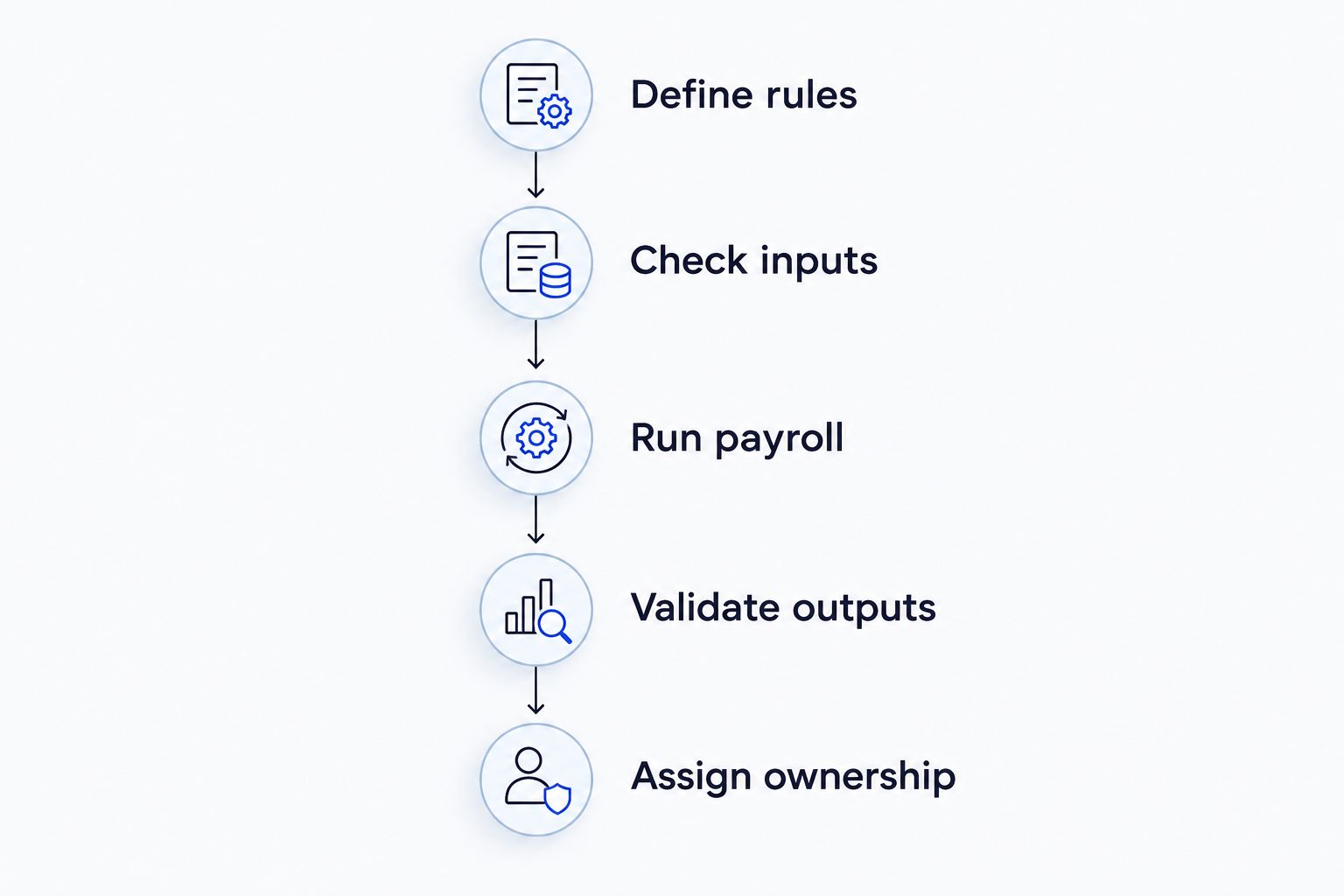
Use the same acceptance sequence for every shortlisted supplier in 2026. Keep the examples consistent so you can compare results rather than presentation quality.
- Define rules: Document the earnings, deductions, approvals, and employee cases the system must handle.
- Check inputs: Trace each payroll input to its approved source and identify missing or conflicting records.
- Run payroll: Ask the supplier to process the agreed cases and explain exceptions.
- Validate outputs: Review payslips, accounting entries, and the bank output with the responsible teams.
- Assign ownership: Record who handles corrections, updates, permissions, and support after launch.
The acceptance sequence should end with an operational decision: can your team explain the result and correct an error without losing the audit trail?
As a proposed acceptance baseline, compare 3 pay periods using approved historical records, with appropriate protection for employee data. Include an ordinary run and relevant exceptions; this is a project recommendation, not a statutory testing requirement.
Set 2 approval stages where your operating model permits: preparation review and payment authorization. Assign 1 accountable owner to maintain the payroll rules and coordinate corrections. These are proposed controls, not statements of Oman law.
For custom development, turn this sequence into written acceptance conditions before agreeing on scope.
Discuss Your HRMS Requirements
Define your HRMS scope, integration needs, and acceptance conditions with Fizmoh.
Which payroll route should you choose?
Start with HRMS-led payroll if you are undecided. It gives you a direct way to assess whether employee records and pay processing belong in a connected workflow.
Choose ERP-connected payroll when finance integration leads the project. Choose standalone payroll when the requirement is genuinely narrow, and reserve enterprise architecture for documented group complexity.
Choose custom development only after identifying a material configuration gap. Do not commission a new system merely to reproduce an untidy spreadsheet process.
FAQ
What's the best payroll software approach for companies in Oman?
HRMS-led payroll is the default approach to assess when employee records, leave, and pay processing need a connected workflow. Verify Oman-specific calculations, bank outputs, and accounting requirements before choosing a product.
Is HRMS payroll better than standalone payroll?
HRMS payroll is the better fit when disconnected HR records are causing payroll rework. Standalone payroll fits a narrower requirement when employee inputs are already controlled and broader HR replacement is unnecessary.
Does payroll software automatically meet Oman requirements?
An Oman-ready label does not establish that a system meets your requirements. Ask the supplier to demonstrate the relevant calculations and outputs, then validate them with your payroll adviser and bank.
Should payroll connect to accounting software?
Connect payroll to accounting when finance needs journals and allocations transferred through a controlled process. Test the resulting entries, account mappings, and corrections rather than accepting an integration claim alone.
When should a company choose custom HRMS development?
Choose custom HRMS development when a documented fit-gap review identifies essential requirements that standard configuration cannot meet. Agree on acceptance tests, maintenance ownership, and update responsibilities before development starts.
Can Fizmoh help with an HRMS project?
Fizmoh offers custom HRMS and ERP development. Define the payroll scope and required integrations explicitly; its stated services do not establish a ready-made payroll product or specific bank compatibility.
How should a company test payroll software before launch?
Test payroll software against approved records and agreed exception cases before launch. Have HR verify inputs, finance review accounting outputs, and the responsible banking team validate the payment output.
One last thing
Before your 2026 purchase decision, ask the supplier to demonstrate a correction after payroll approval. Watch who can make the change, who must approve it, and what happens to the original record.
A payroll demonstration is incomplete until it shows how an error is corrected. The successful run matters; the controlled correction tells you how the system behaves when your team needs it most.